Scroll Bar , Status bar, Side bar
Scroll Bar , Status bar, Side bar:-
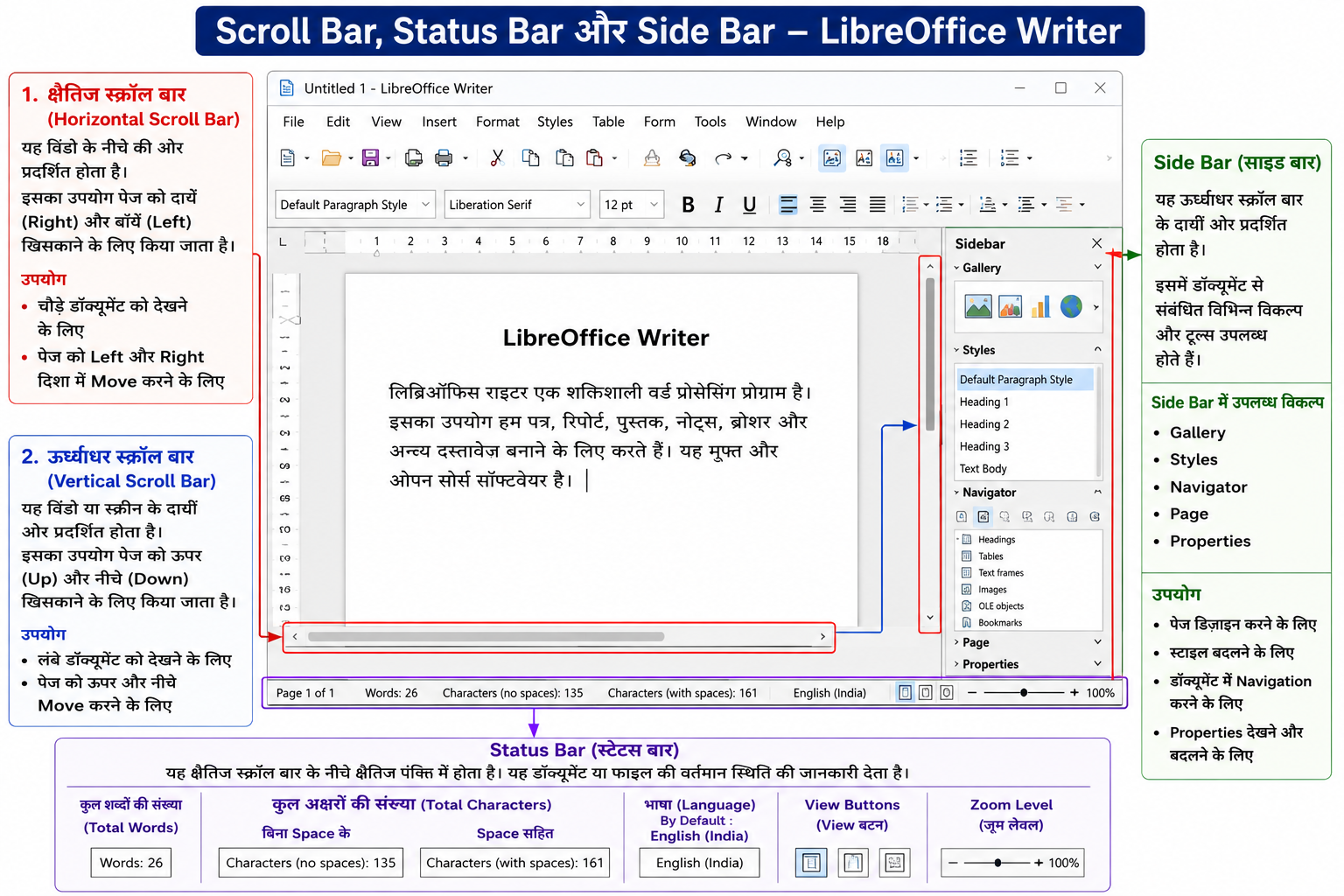
Scroll Bar (स्क्रॉल बार)
Scroll Bar का उपयोग पेज (Page) को ऊपर-नीचे तथा दायें-बाँयें खिसकाने (Move) के लिए किया जाता है।
यह दो प्रकार के होते हैं—
- क्षैतिज स्क्रॉल बार (Horizontal Scroll Bar)
- ऊर्ध्वाधर स्क्रॉल बार (Vertical Scroll Bar)
1. क्षैतिज स्क्रॉल बार (Horizontal Scroll Bar)
यह विंडो के नीचे की ओर प्रदर्शित होता है।
इसका उपयोग पेज को दायें (Right) और बाँयें (Left) खिसकाने के लिए किया जाता है।
उपयोग
-
चौड़े डॉक्यूमेंट को देखने के लिए
-
पेज को Left और Right दिशा में Move करने के लिए
2. ऊर्ध्वाधर स्क्रॉल बार (Vertical Scroll Bar)
यह विंडो या स्क्रीन के दायीं ओर प्रदर्शित होता है।
इसका उपयोग पेज को ऊपर (Up) और नीचे (Down) खिसकाने के लिए किया जाता है।
उपयोग
-
लंबे डॉक्यूमेंट को देखने के लिए
-
पेज को ऊपर और नीचे Move करने के लिए
Status Bar (स्टेटस बार)
Status Bar क्षैतिज स्क्रॉल बार (Horizontal Scroll Bar) के नीचे क्षैतिज पंक्ति (Horizontal Line) में प्रदर्शित होता है।
यह डॉक्यूमेंट या फाइल की वर्तमान स्थिति (Current Status) की जानकारी देता है।
Status Bar पर प्रदर्शित जानकारी
-
कुल शब्दों की संख्या (Total Words)
-
कुल अक्षरों की संख्या (Total Characters)
-
बिना Space के
-
Space सहित
-
-
भाषा (Language)
-
By Default : English (India)
-
-
View Buttons
-
Zoom Level
उपयोग
-
डॉक्यूमेंट की जानकारी देखने के लिए
-
Zoom In और Zoom Out करने के लिए
-
Word Count देखने के लिए
Side Bar (साइड बार)
Side Bar ऊर्ध्वाधर स्क्रॉल बार (Vertical Scroll Bar) के दायीं ओर प्रदर्शित होता है।
इसमें डॉक्यूमेंट से संबंधित विभिन्न विकल्प (Options) और टूल्स (Tools) उपलब्ध होते हैं।
Side Bar में उपलब्ध विकल्प
-
Gallery
-
Styles
-
Navigator
-
Page
-
Properties
उपयोग
-
पेज डिज़ाइन करने के लिए
-
स्टाइल बदलने के लिए
-
डॉक्यूमेंट में Navigation करने के लिए
-
Properties देखने और बदलने के लिए
Scroll Bar:-
A Scroll Bar is used to move the page up-down and left-right.
There are two types of Scroll Bars—
1. Horizontal Scroll Bar
The Horizontal Scroll Bar is displayed at the bottom of the window.
It is used to move the page towards the right and left directions.
Uses
-
To view wide documents
-
To move the page left and right
2. Vertical Scroll Bar
The Vertical Scroll Bar is displayed on the right side of the window or screen.
It is used to move the page upward and downward.
Uses
-
To view long documents
-
To move the page up and down
Status Bar
The Status Bar is displayed in a horizontal line below the Horizontal Scroll Bar.
It shows the current status of the document or file.
Information Displayed on the Status Bar
-
Total number of words (Total Words)
-
Total number of characters (Total Characters)
-
Without spaces
-
With spaces
-
-
Language
-
By Default: English (India)
-
-
View Buttons
-
Zoom Level
Uses
-
To check document information
-
To zoom in and zoom out
-
To view word count
Side Bar
The Side Bar is displayed on the right side of the Vertical Scroll Bar.
It contains different options and tools related to the document.
Options Available in the Side Bar
-
Gallery
-
Styles
-
Navigator
-
Page
-
Properties
Uses
-
To design pages
-
To change styles
-
To navigate the document