Formatting Toolbar (फॉर्मेटिंग टूलबार):-
हिंदी में
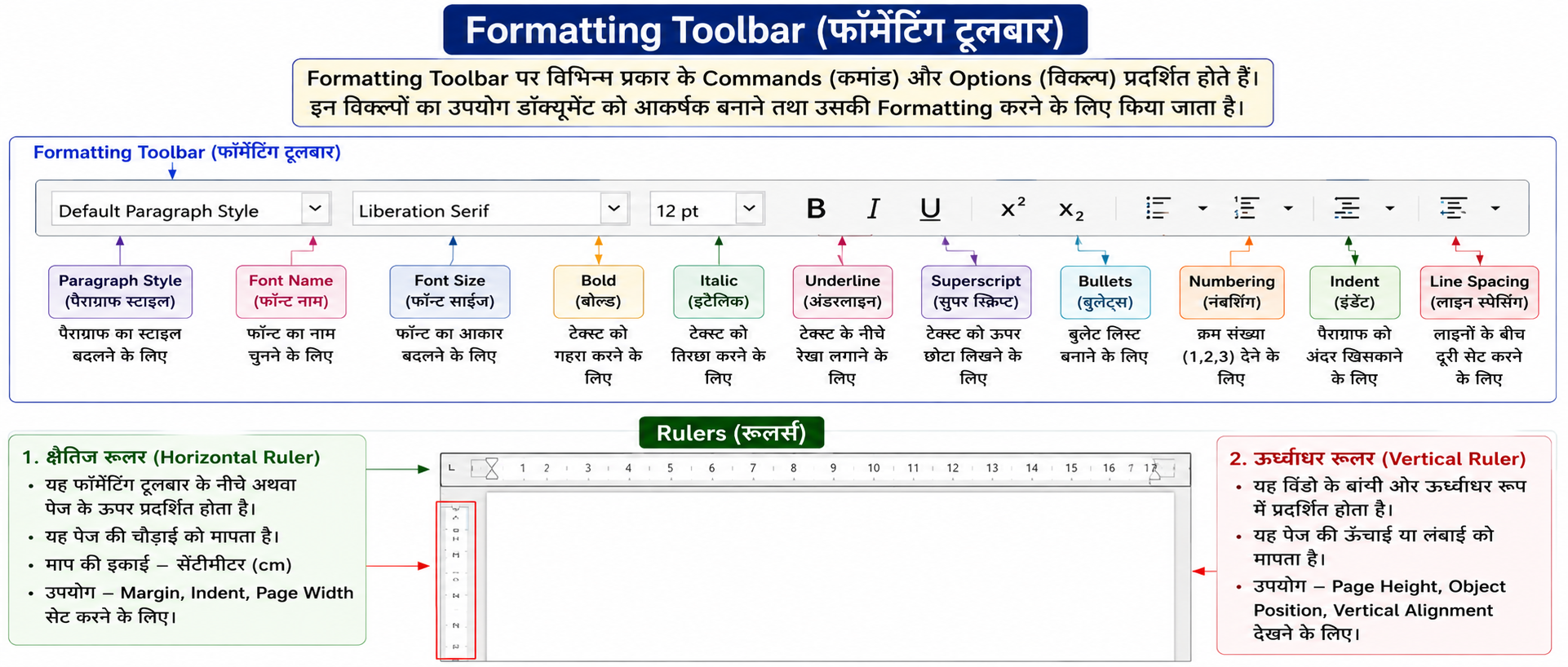
Formatting Toolbar पर विभिन्न प्रकार के Commands (कमाण्ड) और Options (विकल्प) प्रदर्शित होते हैं।
इन विकल्पों का उपयोग डॉक्यूमेंट (Document) को आकर्षक (Attractive) बनाने तथा उसकी Formatting करने के लिए किया जाता है।
इस Toolbar की सहायता से Text का Style, Font, Size और अन्य Formatting आसानी से बदली जा सकती है।
Rulers (रूलर्स) हिंदी में
Rulers डॉक्यूमेंट की माप (Measurement) दिखाने के लिए उपयोग किए जाते हैं।LibreOffice Writer में Ruler (स्केल) की Measurement Unit सामान्यतः Centimeter (cm) होती है।
लेकिन इसे बदला भी जा सकता है:
Tools → Options पर जाएँ।
LibreOffice Writer → General चुनें।
Settings → Measurement Unit में जाएँ।
यहाँ से Centimeter (cm), Millimeter (mm), Inch, Point, Pica आदि चुन सकते हैं।
1 cm = 10 mm
1 inch = 2.54 cm
Pica (पिका) एक Typography Measurement Unit है, जिसका उपयोग Page Layout, Font Size और Publishing में किया जाता है।
1 Pica = 12 Points (pt)
1 Inch = 6 Picas
LibreOffice Writer में दो प्रकार के Rulers होते हैं—
- क्षैतिज रूलर (Horizontal Ruler)
- ऊर्ध्वाधर रूलर (Vertical Ruler)
1. क्षैतिज रूलर (Horizontal Ruler)
यह Formatting Toolbar के नीचे अथवा पेज के ऊपर प्रदर्शित होता है।
यह पेज की चौड़ाई (Width) को मापता है।
इसकी माप की इकाई सामान्यतः सेंटीमीटर (Centimeter - cm) होती है।
उपयोग
- Margin सेट करने के लिए
- Indent सेट करने के लिए
- Page Width मापने के लिए
2. ऊर्ध्वाधर रूलर (Vertical Ruler)
यह विंडो के बाईं ओर ऊर्ध्वाधर रूप (Vertical Form) में प्रदर्शित होता है।
यह पेज की ऊँचाई (Height) या लंबाई (Length) को मापता है।
उपयोग
- Page Height मापने के लिए
- Object Position सेट करने के लिए
- Vertical Alignment देखने के लिए
In English Formatting Toolbar
The Formatting Toolbar displays different commands and options.
These options are used to make the document attractive and to apply formatting.
With the help of this toolbar, users can easily change the style, font, size, and other formatting of the text.
Rulers
Rulers are used to display the measurement of a document.
There are two types of rulers in LibreOffice Writer—
- Horizontal Ruler
- Vertical Ruler
Horizontal Ruler
The Horizontal Ruler is displayed below the Formatting Toolbar or above the page.
It measures the width of the page.
Its measurement unit is usually centimeters (cm).
Uses
- To set margins
- To set indents
- To measure page width
Vertical Ruler
The Vertical Ruler is displayed vertically on the left side of the window.
It measures the height or length of the page.
Uses
- To measure page height
- To set object position
- To check vertical alignment