Table Menu (टेबल मीनू):-
Table Menu का उपयोग Document में Table बनाने, Edit करने, Format करने तथा Data को Manage करने के लिए किया जाता है।
In English:
Table Menu is used to create, edit, format, and manage tables in a document.
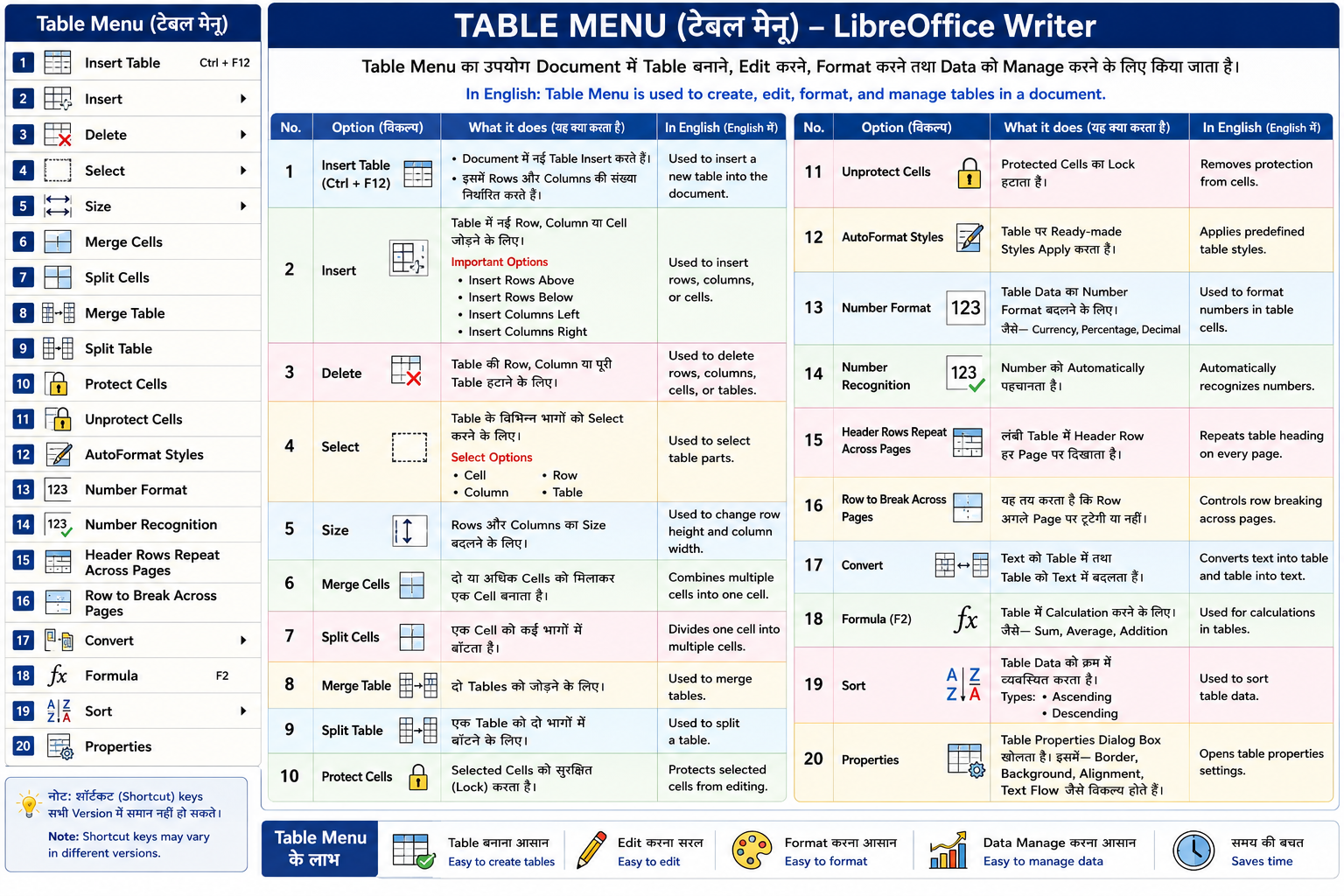
Table Menu Options 1. Insert Table (Ctrl + F12)
इस विकल्प से Document में नई Table Insert करते हैं।
इसमें Rows और Columns की संख्या निर्धारित करते हैं।
In English:
Used to insert a new table into the document.
2. Insert
Table में नई Row, Column या Cell जोड़ने के लिए।
Important Options
- Insert Rows Above
- Insert Rows Below
- Insert Columns Left
- Insert Columns Right
In English:
Used to insert rows, columns, or cells.
3. Delete
Table की Row, Column या पूरी Table हटाने के लिए।
In English:
Used to delete rows, columns, cells, or tables.
4. Select
Table के विभिन्न भागों को Select करने के लिए।
Select Options
- Cell
- Row
- Column
- Table
In English:
Used to select table parts.
5. Size
Rows और Columns का Size बदलने के लिए।
In English:
Used to change row height and column width.
6. Merge Cells
दो या अधिक Cells को मिलाकर एक Cell बनाता है।
In English:
Combines multiple cells into one cell.
7. Split Cells
एक Cell को कई भागों में बाँटता है।
In English:
Divides one cell into multiple cells.
8. Merge Table
दो Tables को जोड़ने के लिए।
In English:
Used to merge tables.
9. Split Table
एक Table को दो भागों में बाँटने के लिए।
In English:
Used to split a table.
10. Protect Cells
Selected Cells को सुरक्षित (Lock) करता है।
In English:
Protects selected cells from editing.
11. Unprotect Cells
Protected Cells का Lock हटाता है।
In English:
Removes protection from cells.
12. AutoFormat Styles
Table पर Ready-made Styles Apply करता है।
In English:
Applies predefined table styles.
13. Number Format
Table Data का Number Format बदलने के लिए।
जैसे—
- Currency
- Percentage
- Decimal
In English:
Used to format numbers in table cells.
14. Number Recognition
Number को Automatically पहचानता है।
In English:
Automatically recognizes numbers.
15. Header Rows Repeat Across Pages
लंबी Table में Header Row हर Page पर दिखाता है।
In English:
Repeats table heading on every page.
16. Row to Break Across Pages
यह तय करता है कि Row अगले Page पर टूटेगी या नहीं।
In English:
Controls row breaking across pages.
17. Convert
Text को Table में तथा Table को Text में बदलता है।
In English:
Converts text into table and table into text.
18. Formula (F2)
Formula (फ़ॉर्मूला) एक ऐसा Expression (व्यंजक) होता है जिसका उपयोग गणितीय गणनाएँ (Mathematical Calculations) करने के लिए किया जाता है। LibreOffice Writer में Formula का उपयोग मुख्यतः Table के अंदर मौजूद संख्याओं (Numbers) पर Calculation करने के लिए किया जाता है।
English:
A Formula is an expression used to perform mathematical calculations. In LibreOffice Writer, formulas are mainly used to calculate values stored in a table.
Formula लगाने के चरण (Steps to Insert a Formula) -
- Insert → Table पर क्लिक करके Table बनाएं।
Click on Insert → Table to create a table. - जिन Cells में Numbers हैं, उनमें आवश्यक मान (Values) दर्ज करें।
Enter the required numbers in the cells. - जिस Cell में परिणाम (Result) दिखाना है, उसमें Cursor रखें।
Place the cursor in the cell where you want to display the result. - Table → Formula चुनें या Keyboard से F2 Key दबाएँ।
Select Table → Formula or press the F2 key on the keyboard. - आवश्यक Formula लिखें (जैसे =<A1>+<B1> या =sum <A1:B1>)।
Type the required formula (for example, =<A1>+<B1> or =sum <A1:B1>). - Enter Key दबाएँ, Formula की गणना होकर परिणाम दिखाई देगा।
Press the Enter key to calculate the formula and display the result.
जैसे—
- Sum
- Average
- Addition
Arithmetic Formulas (अंकगणितीय फ़ॉर्मूले) - 1. Addition (जोड़) -
=<A1>+<B1>
दो या अधिक संख्याओं को जोड़ने के लिए।
Used to add two or more numbers.
2. Subtraction (घटाव) -
=<A1>-<B1>
एक संख्या में से दूसरी संख्या घटाने के लिए।
Used to subtract one number from another.
3. Multiplication (गुणा) -
=<A1>*<B1>
दो संख्याओं का गुणन करने के लिए।
Used to multiply two numbers.
4. Division (भाग) -
=<A1>/<B1>
एक संख्या को दूसरी संख्या से विभाजित करने के लिए।
Used to divide one number by another.
5. Power (घात) -
=<A1>^2
किसी संख्या की घात (Power) निकालने के लिए।
Used to calculate the power of a number.
Aggregate Functions (सामूहिक फ़ंक्शन) -
SUM -
=SUM <A1:A5>
निर्धारित Range का कुल योग निकालता है।
Returns the total of the selected range.
MEAN (Average) -
संख्याओं का औसत निकालता है।
Calculates the average of the numbers.
MAX -
सबसे बड़ी संख्या देता है।
Returns the largest value.
MIN -
=min <A1:A5>
सबसे छोटी संख्या देता है।
Returns the smallest value.
PRODUCT -
सभी संख्याओं का गुणनफल निकालता है।
Returns the product of all numbers.
19. Sort
Table Data को क्रम में व्यवस्थित करता है।
Types
- Ascending
- Descending
In English:
Used to sort table data.
20. Properties
Table Properties Dialog Box खोलता है।
इसमें—
- Border
- Background
- Alignment
- Text Flow
जैसे विकल्प होते हैं।
In English:
Opens table properties settings.