Insert Menu (इन्सर्ट मीनू)
Insert Menu का उपयोग Document में अलग-अलग प्रकार के Objects, Text, Images, Tables, Symbols आदि Insert करने के लिए किया जाता है।
In English: Insert Menu is used to insert different types of objects, text, images, tables, symbols, etc. into a document.
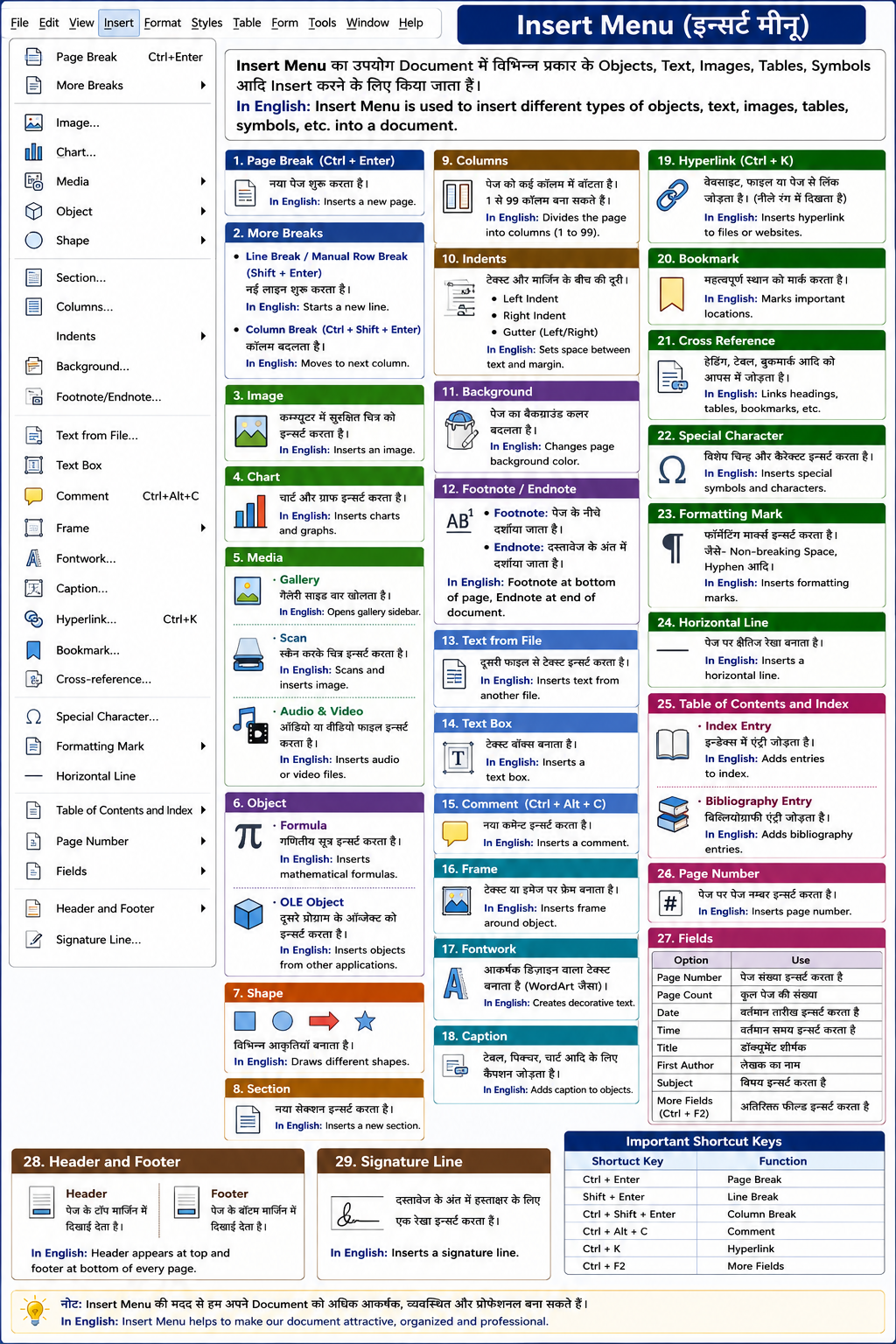
Important Commands of Insert Menu 1. Page Break (Ctrl + Enter)
इस विकल्प से नया Page शुरू किया जाता है।
Cursor जहाँ होता है, वहीं से अगला Page शुरू हो जाता है।
In English:
This option inserts a new page from the cursor position.
2. More Breaks (a) Line Break / Manual Row Break (Shift + Enter)
इससे नई Line शुरू होती है लेकिन नया Paragraph नहीं बनता।
In English:
Starts a new line without creating a new paragraph.
(b) Column Break (Ctrl + Shift + Enter)
इससे Column बदला जाता है।
In English:
Used to move text to the next column.
3. Image
इस विकल्प से Computer में Save किसी Picture को Document में Insert करते हैं।
In English:
Used to insert an image into the document.
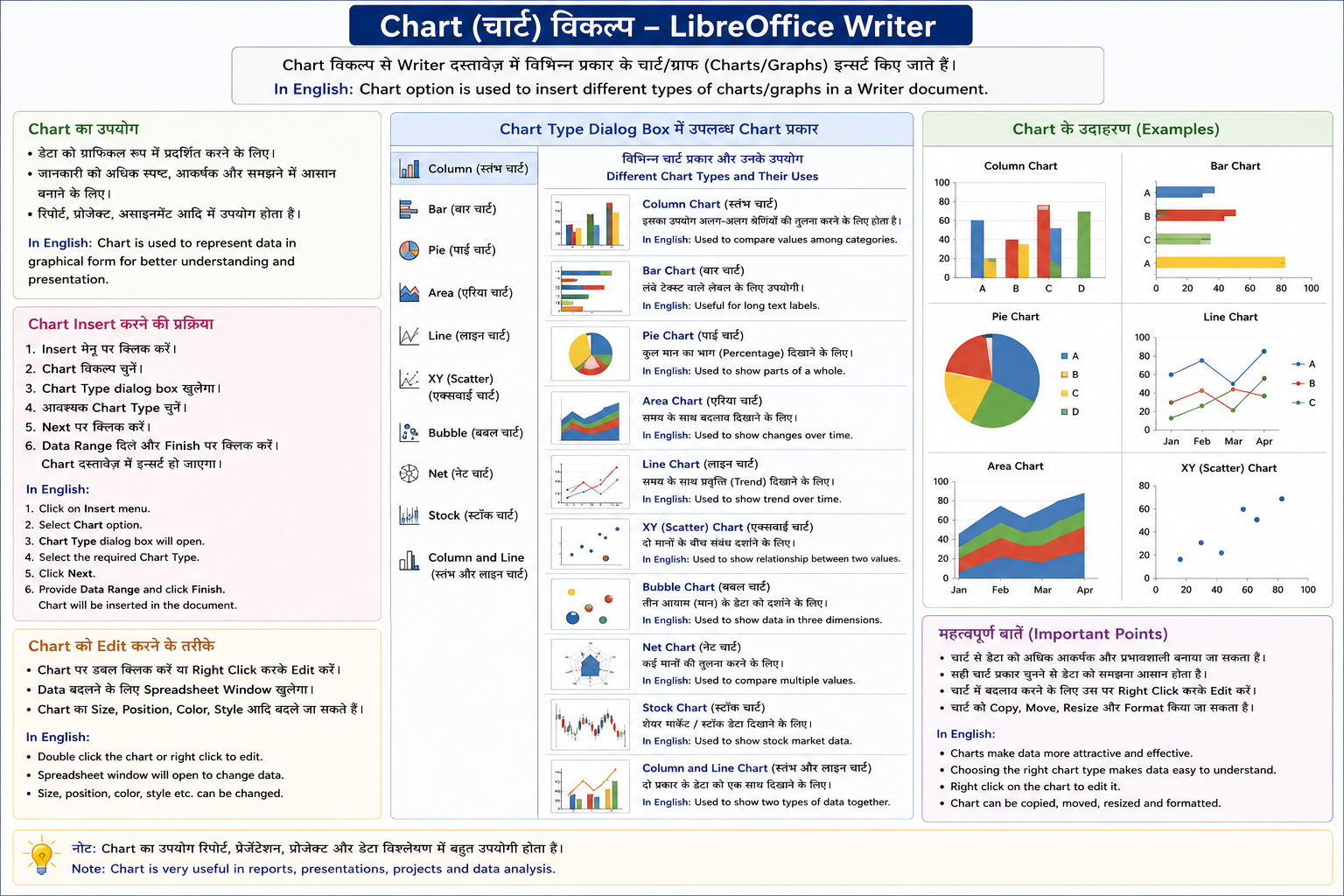
4. Chart
इस विकल्प से Graph और Chart Insert करते हैं।
In English:
Used to insert charts and graphs.
5. Media (a) Gallery
Gallery Sidebar खोलता है जिसमें कई Pictures होती हैं।
In English:
Opens gallery sidebar containing pictures.
(b) Scan
Scanner की सहायता से Image Scan करके Insert करते हैं।
In English:
Used to scan and insert images.
(c) Audio & Video
Audio या Video File Insert करने के लिए।
In English:
Used to insert audio and video files.
6. Object (a) Formula
Mathematical Formula Insert करने के लिए।
In English:
Used to insert mathematical formulas.
(b) OLE Object
दूसरे Program के Object को Insert करने के लिए।
In English:
Used to insert objects from other applications.
7. Shape
इस विकल्प से अलग-अलग Shapes बनाते हैं।
जैसे—
- Rectangle
- Circle
- Arrow
- Line
In English:
Used to draw different shapes.
8. Section
Document में नया Section Insert करने के लिए।
In English:
Used to insert a new section.
9. Columns
Page को कई Columns में बाँटने के लिए।
LibreOffice Writer में 1 से 99 Columns बना सकते हैं।
In English:
Used to divide the page into columns.
10. Indents
Text और Margin के बीच की दूरी को Indent कहते हैं।
Types of Indent
- Left Indent
- Right Indent
- Gutter
In English:
Indent means space between text and margin.
11. Background
Page का Background Color बदलने के लिए।
In English:
Used to change page background color.
12. Footnote / Endnote Footnote
Page के नीचे Explanation लिखने के लिए।
Endnote
Document के अंत में Note लिखने के लिए।
In English:
Footnote appears at bottom of page, Endnote appears at end of document.
13. Text from File
दूसरी File से Text Insert करने के लिए।
In English:
Used to insert text from another file.
14. Text Box
Page पर Box बनाकर उसमें Text लिखने के लिए।
In English:
Used to insert a text box.
15. Comment (Ctrl + Alt + C)
Document में Comment जोड़ने के लिए।
In English:
Used to insert comments.
16. Frame
Text या Image के चारों ओर Frame बनाने के लिए।
In English:
Used to insert frames around objects.
17. Fontwork
Attractive Design वाला Text बनाने के लिए।
यह MS Word के WordArt जैसा होता है।
In English:
Used to create decorative text.
18. Caption
Picture, Table, Chart आदि के नीचे Description जोड़ने के लिए।
In English:
Used to add labels or descriptions to objects.
19. Hyperlink (Ctrl + K)
किसी Website, File या Page से Link जोड़ने के लिए।
Hyperlink सामान्यतः Blue Color में दिखाई देता है।
In English:
Used to insert links to websites or files.
20. Bookmark
Document में Important Place Mark करने के लिए।
In English:
Used to mark important locations in a document.
21. Cross Reference
Document के अलग-अलग भागों को आपस में जोड़ने के लिए।
In English:
Used to link headings, tables, bookmarks, etc.
22. Special Character
Special Symbols Insert करने के लिए।
जैसे—
- ©
- ₹
- ™
- §
In English:
Used to insert special symbols and characters.
23. Formatting Mark
Special Formatting Symbols Insert करने के लिए।
जैसे—
- Non-breaking Space
- Hyphen
In English:
Used to insert formatting marks.
24. Horizontal Line
Page पर Horizontal Line Insert करने के लिए।
In English:
Used to insert a horizontal line.
25. Table of Contents and Index (a) Index Entry
Index में Heading और Topics जोड़ने के लिए।
In English:
Used to insert entries into the index.
(b) Bibliography Entry
Reference या Source जोड़ने के लिए।
In English:
Used to insert bibliography references.
26. Page Number
Page पर Page Number Insert करने के लिए।
In English:
Used to insert page numbers.
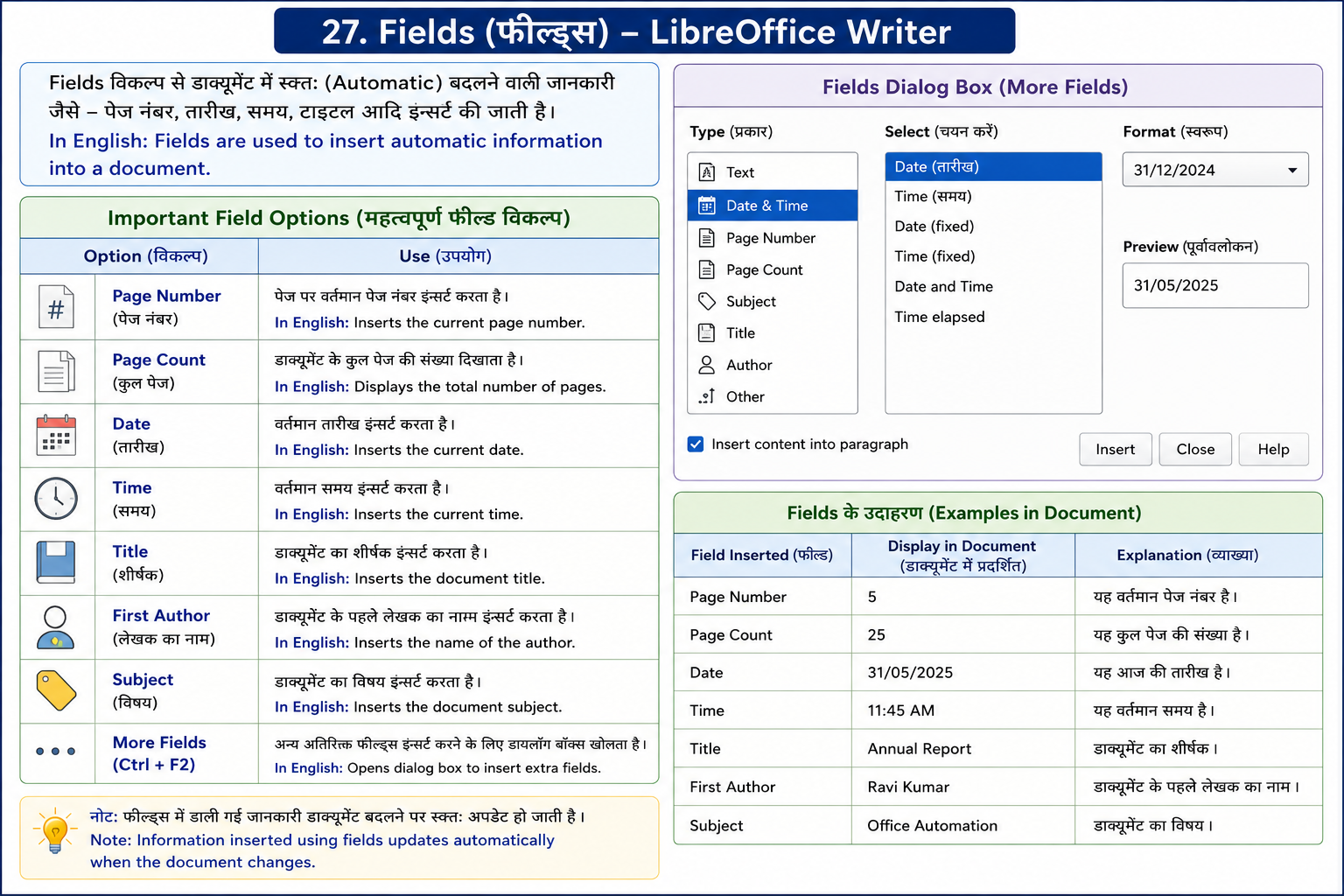
27. Fields Important Field Options
In English:
Fields are used to insert automatic information into a document.
28. Header and Footer Header
Page के Top Margin में दिखाई देता है।
Footer
Page के Bottom Margin में दिखाई देता है।
दोनों प्रत्येक Page पर समान रहते हैं।
In English:
Header appears at top and footer appears at bottom of every page.
29. Signature Line
Document में Signature के लिए Line Insert करने के लिए।
In English:
Used to insert a signature line.