Edit Menu (इडिट मीनू)
Edit Menu का उपयोग Document के Text या Matter को Edit करने के लिए किया जाता है।
इसमें Text को Cut, Copy, Paste, Find, Replace आदि करने के विभिन्न विकल्प होते हैं।
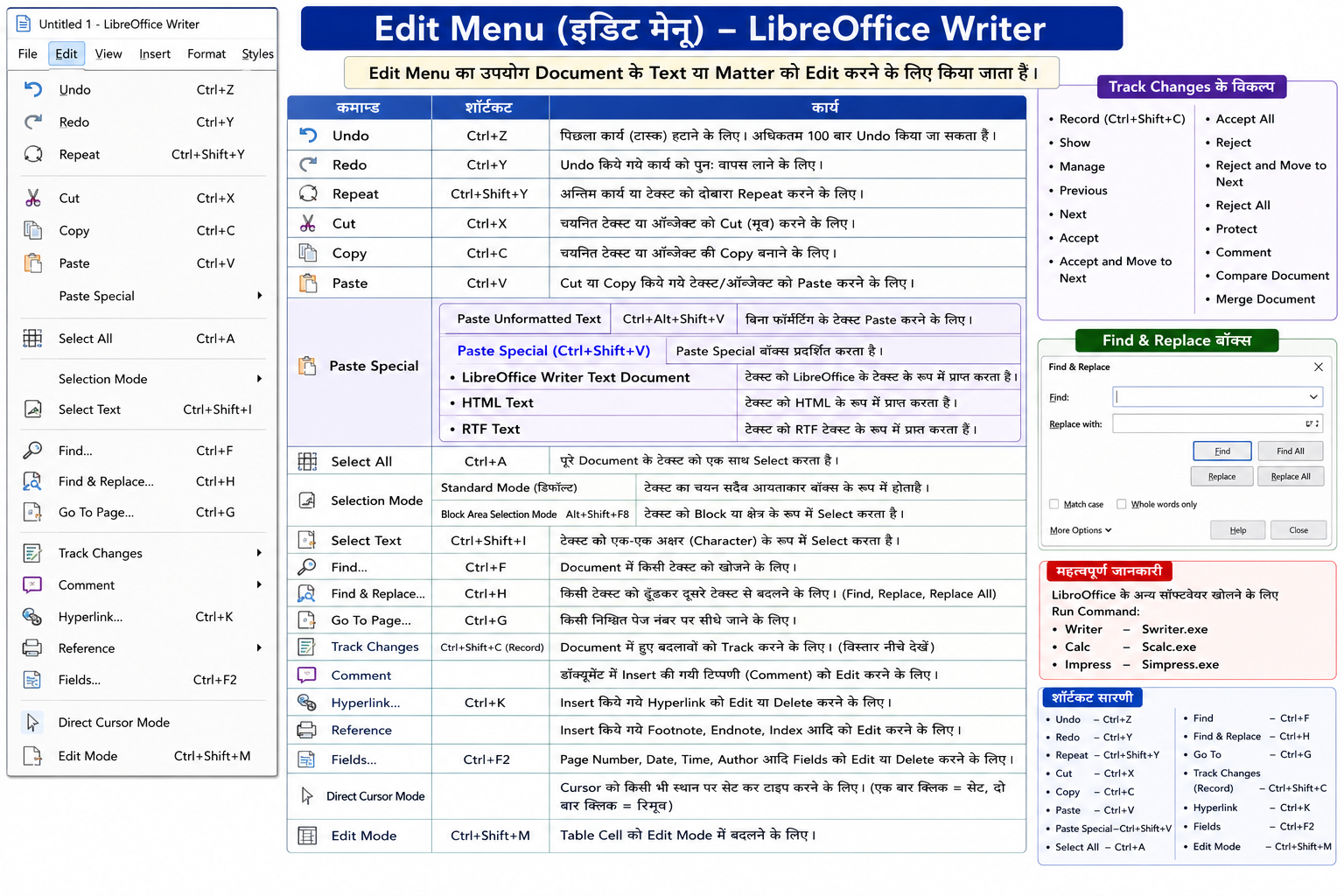
Undo (Ctrl + Z)
इस विकल्प का उपयोग पिछले कार्य (Previous Task) को हटाने के लिए किया जाता है।
अधिकतम 100 बार Undo किया जा सकता है।
In English:
This option is used to remove the previous task.
Redo (Ctrl + Y)
यह विकल्प तभी सक्रिय होता है जब Undo का उपयोग किया गया हो।
इससे हटाए गए कार्य को पुनः वापस लाया जाता है।
In English:
This option restores the previously undone task.
Repeat (Ctrl + Shift + Y)
इस विकल्प से अंतिम कार्य या Text को दोबारा Repeat किया जाता है।
उदाहरण:
Ram, Ram, Ram
In English:
This option repeats the last action or text.
Cut (Ctrl + X)
इस विकल्प से चयनित Text या Object को Cut किया जाता है।
अर्थात् उसे एक स्थान से हटाकर दूसरे स्थान पर ले जाया जाता है।
In English:
This option cuts the selected text or object.
Copy (Ctrl + C)
इस विकल्प से चयनित Text या Object की Copy बनाई जाती है।
In English:
This option copies the selected text or object.
Paste (Ctrl + V)
Cut या Copy किए गए Text या Object को पुनः प्राप्त करने के लिए Paste का उपयोग किया जाता है।
In English:
This option pastes the cut or copied text/object.
Paste Special
Paste Special के अंतर्गत विभिन्न प्रकार से Paste करने के विकल्प उपलब्ध होते हैं।
Paste Unformatted Text
(Ctrl + Alt + Shift + V)
इस विकल्प से Text बिना Formatting के Paste किया जाता है।
In English:
This option pastes text without formatting.
Paste Special
(Ctrl + Shift + V)
इस विकल्प से Paste Special Dialog Box खुलता है।
इसके मुख्य विकल्प—
-
LibreOffice Writer Text Document
-
HTML Text
-
RTF Text
Select All (Ctrl + A)
इस विकल्प से पूरे Document का Text एक साथ Select किया जाता है।
In English:
This option selects all text in the document.
Standard Mode
यह By Default चयन मोड होता है।
इसमें Text आयताकार (Rectangular) रूप में Select होता है।
In English:
This is the default selection mode.
Block Area Selection Mode
(Alt + Shift + F8 / Ctrl + Shift + F8)
इस विकल्प से Text को Block या विशेष क्षेत्र के रूप में Select किया जाता है।
In English:
This option selects text in block form.
Select Text
(Ctrl + Shift + I)
इस विकल्प से Text को एक-एक Character के रूप में Select किया जाता है।
In English:
This option selects text character by character.
Find (Ctrl + F)
इस विकल्प से Document में किसी Text को खोजा जाता है।
जिस Text को ढूँढना हो उसे Find Box में लिखते हैं।
In English:
This option searches text in the document.
Find & Replace (Ctrl + H)
इस विकल्प से किसी Text को खोजकर दूसरे Text से बदला जाता है।
इसके मुख्य विकल्प—
-
Find
-
Replace
-
Replace All
In English:
This option finds and replaces text in the document.
Go To (Ctrl + G)
इस विकल्प से किसी निश्चित Page Number पर सीधे पहुँचा जाता है।
In English:
This option jumps directly to a specific page.
Track Changes
इस विकल्प से Document में किए गए बदलावों को Track किया जाता है।
इसके मुख्य विकल्प—
-
Record
-
Show
-
Manage
-
Previous
-
Next
-
Accept
-
Accept and Move to Next
-
Accept All
-
Reject
-
Reject and Move to Next
-
Reject All
-
Protect
-
Comment
-
Compare Document
-
Merge Document
Record (Ctrl + Shift + C)
इस विकल्प से Track Changes चालू किया जाता है।
Show
इस विकल्प से किए गए बदलाव दिखाई देते हैं।
Manage
इस विकल्प से Track Changes Dialog Box खुलता है।
Previous / Next
इन विकल्पों से पिछले और अगले बदलाव देखे जाते हैं।
Accept
इस विकल्प से बदलाव स्वीकार किया जाता है।
Reject
इस विकल्प से बदलाव अस्वीकार किया जाता है।
Protect
इस विकल्प से Document पर Password लगाया जा सकता है।
Comment
इस विकल्प से Insert की गई Comment को Edit किया जाता है।
Compare Document
इस विकल्प से दो Documents की तुलना (Compare) की जाती है।
Merge Document
इस विकल्प से दो Documents को मिलाया जाता है।
Hyperlink
इस विकल्प से Insert किए गए Hyperlink को Edit या Delete किया जाता है।
In English:
This option edits or deletes hyperlinks.
Reference
इस विकल्प से Footnote, Endnote तथा Index आदि को Edit किया जाता है।
In English:
This option edits references like footnotes and indexes.
Fields
इस विकल्प से Page Number, Date, Time, Author आदि Fields को Edit या Delete किया जाता है।
In English:
This option edits fields such as page number, date, and time.
Direct Cursor Mode
इस विकल्प से Cursor को Page पर किसी भी स्थान पर Set किया जा सकता है।
In English:
This option allows typing anywhere on the page.
Edit Mode (Ctrl + Shift + M)
इस विकल्प से Table Cell को Edit Mode में बदला जाता है।
In English:
This option changes the table cell into edit mode.