Format Menu (फॉर्मेट मीनू)
Format Menu का उपयोग Document के Text, Paragraph, Page, Image तथा अन्य Objects की Formatting करने के लिए किया जाता है।
In English:
Format Menu is used to format text, paragraphs, pages, images, and objects in a document.
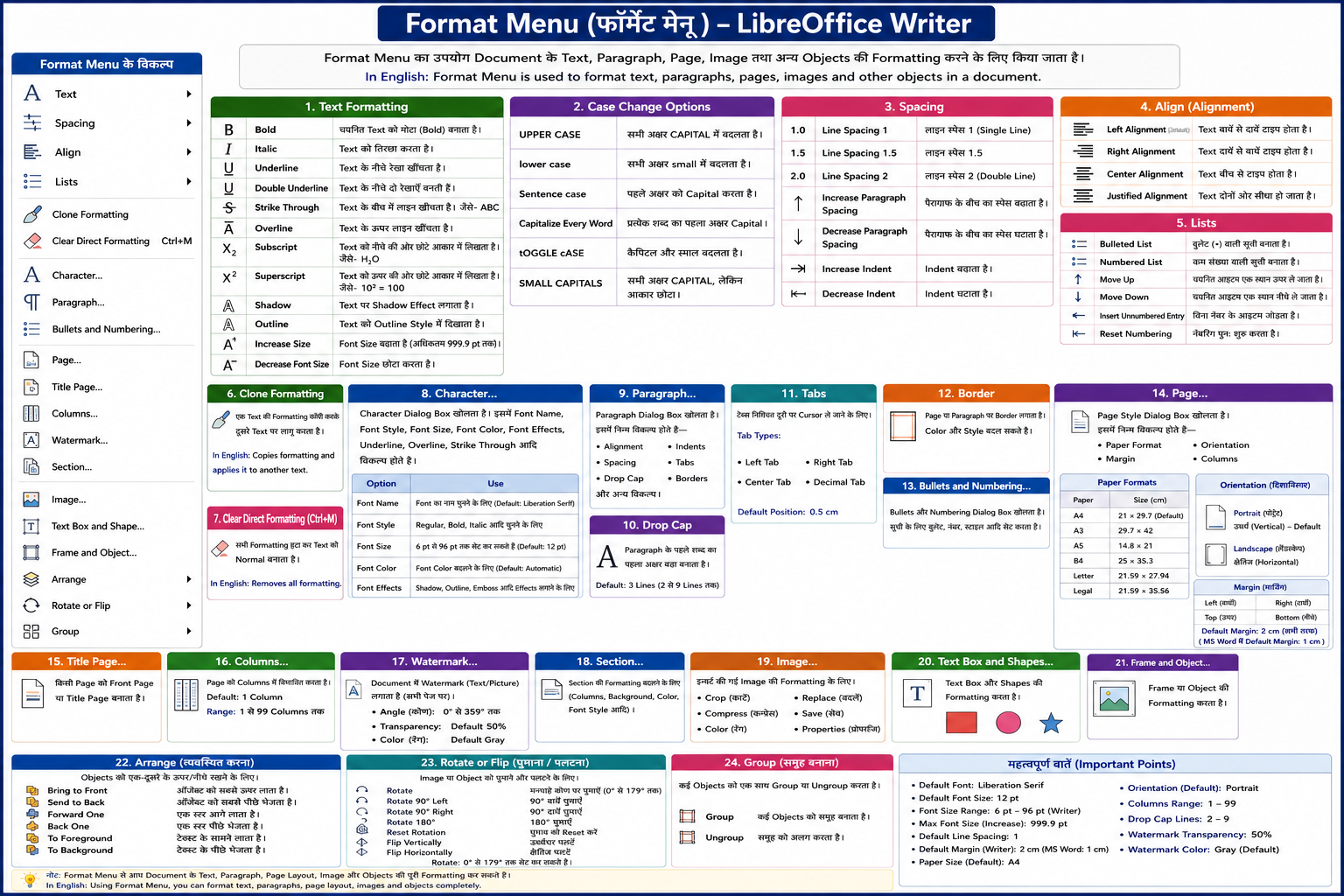
1. Text Formatting Bold
चयनित Text को मोटा (Bold) बनाता है।
In English:
Makes the selected text bold.
Italic
Text को तिरछा करता है।
In English:
Makes the text italic.
Underline
Text के नीचे रेखा खींचता है।
In English:
Adds an underline below text.
Double Underline
Text के नीचे दो रेखाएँ बनती हैं।
In English:
Adds double underline.
Strike Through
Text के बीच में लाइन खींचता है।
Example: ABC
In English:
Draws a line through the text.
Overline
Text के ऊपर लाइन खींचता है।
In English:
Adds a line above the text.
Subscript
Text को नीचे की ओर छोटे आकार में लिखता है।
Example: H₂O
In English:
Displays small text below baseline.
Superscript
Text को ऊपर की ओर छोटे आकार में लिखता है।
Example: 10²
In English:
Displays small text above baseline.
Shadow
Text पर Shadow Effect लगाता है।
In English:
Adds shadow effect to text.
Outline
Text को Outline Style में दिखाता है।
In English:
Displays text in outline form.
Increase Size
Font Size बढ़ाता है।
LibreOffice में अधिकतम 999.9 pt तक।
In English:
Increases font size.
Decrease Font Size
Font Size छोटा करता है।
In English:
Decreases font size.
2. Case Change Options
In English:
Used to change text letter style.
3. Spacing
- Line Spacing 1 :- इस विकल्प से लाइन या पैराग्राफ के बीच के स्पेस को एक लाइन के बराबर सेट रहता है। बाई डिफाल्ट यह विकल्प सेट रहता है।
- Line Spacing 1.5 :- इस विकल्प से दो लाइनों या पैराग्राफ के बीच 1.5 के बराबर का स्पेस सेट करते हैं।
- Line Spacing 2 :- इस विकल्प से लाइनों के बीच डबल लाइन के बीच स्पेस के बराबर सेट करते हैं।
- Increse Paragraph Spacing :- इस विकल्प से दो पैराग्राफ के बीच के स्पेस को बढ़ाते हैं।
- Decrese Paragraph Spacing :- इस विकल्प से दो पैराग्राफ के बीच के स्पेस को घटाते हैं।
- Increase Indent :- इस विकल्प से लेफ्ट या राइट इन्डेण्ट्स की वैल्यू को बढ़ाते हैं। बाई डिफाल्ट दोनों इन्डेण्ट शून्य सेंटीमीटर सेट रहते हैं।
- Decrease Indent :- इस विकल्प से दोनों इन्डेण्ट के वैल्यू को कम करते हैं। बाई डिफाल्ट दोनों इन्डेण्ट शून्य सेंटीमीटर सेट रहते हैं।
4. Alignment
Left Alignment
Text बाईं ओर सीधा रहता है।
(Default Alignment)
Right Alignment
Text दाईं ओर सीधा रहता है।
Center Alignment
Text बीच में दिखाई देता है।
Justify Alignment
Text दोनों ओर बराबर सीधा दिखाई देता है।
In English:
Alignment controls text position on page.
5. Lists Bulleted List
Bullet Symbols के साथ List बनती है।
Numbered List
Numbers के साथ List बनती है।
Move Up / Move Down
List Item ऊपर या नीचे ले जाता है।
Reset Numbering
Numbering पुनः शुरू करता है।
In English:
Used to create and manage lists.
6. Clone Formatting
एक Text की Formatting कॉपी करके दूसरे Text पर लागू करता है।
In English:
Copies formatting from one text to another.
7. Clear Direct Formatting
सारी Formatting हटाकर Text को Normal बनाता है।
In English:
Removes all formatting from selected text.
8. Character
Character Dialog Box खोलता है।
इसमें—
- Font Name
- Font Style
- Font Size
- Font Color
- Underline
- Overline
- Strike Through
जैसे विकल्प होते हैं।
In English:
Opens character formatting dialog box.
Important Character Options Font Name
Font Style चुनने के लिए।
Default: Liberation Serif
Font Style
Regular, Bold, Italic आदि।
Font Size
Default: 12 pt
Range: 6 pt to 96 pt
Font Color
Text Color बदलने के लिए।
Font Effects
Text पर Effects लगाने के लिए।
9. Paragraph
Paragraph Formatting Dialog Box खोलता है।
इसमें—
- Alignment
- Spacing
- Indent
- Border
- Tabs
- Drop Cap
आदि विकल्प होते हैं।
10. Drop Cap
इस विकल्प से पैराग्राफ के पहले शब्द का पहला अक्षर आकार में बड़ा हो जाता है। और उसके आगे इच्छानुसार कुछ लाइनों को ड्राप कैप करते हैं। अर्थात् टाइप कर सकते हैं। बाई डिफाल्ट तीन लाइन ड्राप होती है। 2 से 9 लाइन तक ड्राप कर सकते हैं।
In English:
Makes first letter large and decorative.
11. Tabs
Tabs निश्चित दूरी पर Cursor ले जाने के लिए।
Types of Tabs
- Left
- Right
- Center
- Decimal
Default Position: 0.5 cm
In English:
Tabs move cursor to fixed positions.
12. Border
Page या Paragraph पर Border लगाता है।
Color और Style बदल सकते हैं।
In English:
Used to apply borders.
13. Bullets and Numbering
Bullet तथा Number वाली Lists बनाने के लिए।
In English:
Used to create bullets and numbered lists.
14. Page
इससे पेज स्टाइल डायलॉग बाक्स प्रदर्शित होता है इस बॉक्स में पेपर फार्मेट, साइज, ओरिएन्टेशन, मार्जिन आदि विकल्प होते हैं।
Paper Format:- इस विकल्प से प्रिंट के लिए पेपर के आकार का चयन करते हैं इसमें A4, A3, A5, B4, B5, B3, letter आदि पेपर होते हैं।
बाई डिफाल्ट A4 पेपर साइज सेट रहता है।
A4 पेपर की चौड़ाई 23 सेमी. और लम्बाई व ऊँचाई 29.7 सेमी. होती है।
Letter पेपर की साइज चौड़ाई 21.59 सेमी., ऊँचाई व लम्बाई 27.94 सेमी. होती है।
Legal पेपर 21.59 सेमी., ऊँचाई व लम्बाई 35.56 सेमी. होती है।
15. Orientation Portrait
Vertical Page Layout।
(Default)
Landscape
Horizontal Page Layout।
In English:
Changes page direction.
16. Margin
चार प्रकार की Margin होती हैं—
- Left
- Right
- Top
- Bottom
Default: 2 cm
In English:
Margins set blank space around page.
17. Title Page
किसी Page को Front Page बनाता है।
In English:
Creates title page.
18. Columns
Page को कई Columns में बाँटता है।
Range: 1–99 Columns
In English:
Divides page into columns.
19. Watermark
Document सुरक्षा के लिए हल्का Text/Image Background में दिखाता है।
Default Transparency: 50%
Default Color: Gray
In English:
Used for document protection and identification.
20. Section
Selected Section की Formatting बदलने के लिए।
In English:
Formats selected section.
21. Image Formatting Crop
अनावश्यक भाग काटता है।
Replace
दूसरी Image से बदलता है।
Compress
Image Size कम करता है।
Color
Image Color बदलता है।
Properties
Image की जानकारी दिखाता है।
In English:
Used to edit and format images.
22. Arrange
Objects की Position बदलता है।
Important Options
23. Rotate and Flip Rotate
Image घुमाने के लिए।
Flip Vertically
ऊपर-नीचे पलटता है।
Flip Horizontally
दाएँ-बाएँ पलटता है।
In English:
Used to rotate and flip images.
24. Group / Ungroup
कई Objects को एक Object बनाता है।
Ungroup से अलग करता है।
In English:
Groups or separates objects.