Styles Menu (स्टाइल्स मेनू) :-
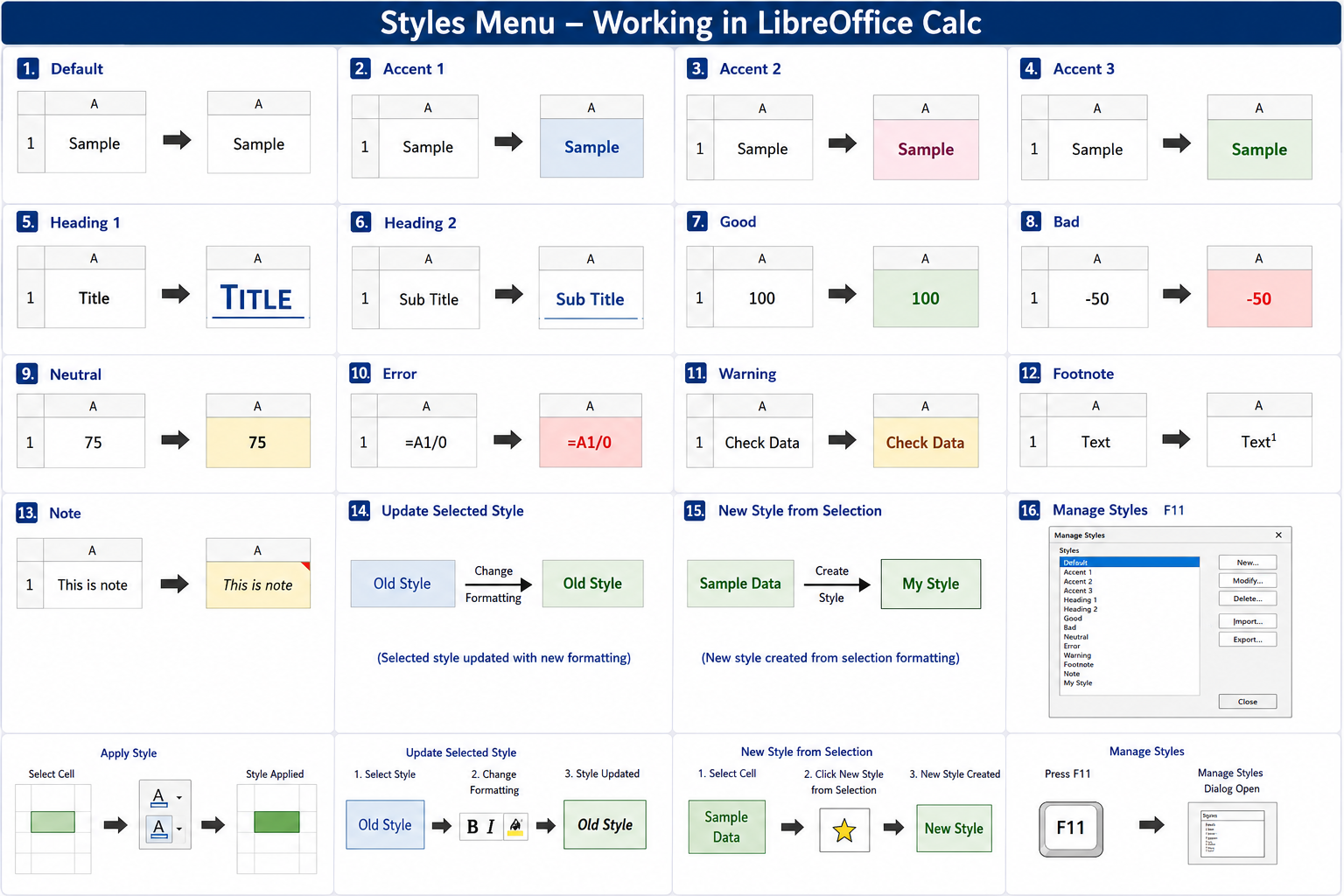
Styles Menu का उपयोग Cell, Text तथा Spreadsheet पर पहले से बने हुए Styles लागू करने और नए Styles बनाने के लिए किया जाता है। यह LibreOffice Calc का एक Predefined Cell Style है। इनमें पहले से ही Font, Font Size, Color, Background Color, Border, Alignment जैसी Formatting सेट होती है।
English: The Styles Menu is used to apply predefined styles and create or manage styles for cells, text, and spreadsheets. Applies a predefined cell style to highlight the selected cell with a specific color and formatting.
1. Default :-
Hindi: चयनित Cell पर Default Style लागू करता है।
English: Applies the default style to the selected cell.
Shortcut Key: No Default Shortcut
2. Accent 1 :-
Hindi: पहले Accent Style को लागू करता है।
English: Applies the first accent style.
Shortcut Key: No Default Shortcut
3. Accent 2 :-
Hindi: दूसरे Accent Style को लागू करता है।
English: Applies the second accent style.
Shortcut Key: No Default Shortcut
4. Accent 3 :-
Hindi: तीसरे Accent Style को लागू करता है।
English: Applies the third accent style.
Shortcut Key: No Default Shortcut
5. Heading 1 :-
Hindi: मुख्य Heading के लिए Style लागू करता है।
English: Applies the primary heading style.
Shortcut Key: No Default Shortcut
6. Heading 2 :-
Hindi: उप-शीर्षक (Sub Heading) के लिए Style लागू करता है।
English: Applies the secondary heading style.
Shortcut Key: No Default Shortcut
7. Good :-
Hindi: अच्छे या सही Data को Highlight करने के लिए Style लागू करता है।
English: Applies a style to highlight good or positive data.
Shortcut Key: No Default Shortcut
8. Bad :-
Hindi: गलत या नकारात्मक Data को Highlight करने के लिए।
English: Applies a style to highlight bad or negative data.
Shortcut Key: No Default Shortcut
9. Neutral :-
Hindi: सामान्य (Neutral) Data के लिए Style लागू करता है।
English: Applies a neutral style to the selected data.
Shortcut Key: No Default Shortcut
10. Error :-
Hindi: Error वाले Data को Highlight करने के लिए।
English: Applies an error style to highlight incorrect data.
Shortcut Key: No Default Shortcut
11. Warning :-
Hindi: चेतावनी (Warning) वाले Data को Highlight करता है।
English: Applies a warning style to important data.
Shortcut Key: No Default Shortcut
12. Footnote :-
Hindi: Footnote के लिए Style लागू करता है।
English: Applies the footnote style.
Shortcut Key: No Default Shortcut
13. Note :-
Hindi: Note या टिप्पणी के लिए Style लागू करता है।
English: Applies the note style.
Shortcut Key: No Default Shortcut
14. Update Selected Style :-
Hindi: वर्तमान Formatting के अनुसार चुने हुए Style को Update करता है।
English: Updates the selected style using the current formatting.
Shortcut Key: No Default Shortcut
15. New Style from Selection :-
Hindi: चयनित Cell की Formatting से नया Style बनाता है।
English: Creates a new style from the selected formatting.
Shortcut Key: No Default Shortcut
16. Manage Styles :-
Hindi: सभी Styles को देखने, Edit करने तथा नया Style बनाने के लिए।
English: Opens the Styles Manager to create, edit, and manage styles.
Shortcut Key: F11