Cell Referencing (Cell Reference) :-
Spreadsheet में किसी Cell के Address (जैसे A1, B2) का उपयोग Formula या Function में करना Cell Referencing कहलाता है।
English
Using the address of a cell (such as A1, B2) in a formula or function is called Cell Referencing.
Cell Address (सेल एड्रेस) :-
Cell Address = Column Letter + Row Number
English
Cell Address = Column Letter + Row Number
Examples
-
A1 = Column A, Row 1
-
B5 = Column B, Row 5
-
C10 = Column C, Row 10
Types of Cell Referencing (Cell Referencing के प्रकार) :-
Cell Referencing मुख्यतः 3 प्रकार की होती है:
-
Relative Reference (सापेक्ष संदर्भ)
-
Absolute Reference (निरपेक्ष संदर्भ)
-
Mixed Reference (मिश्रित संदर्भ)
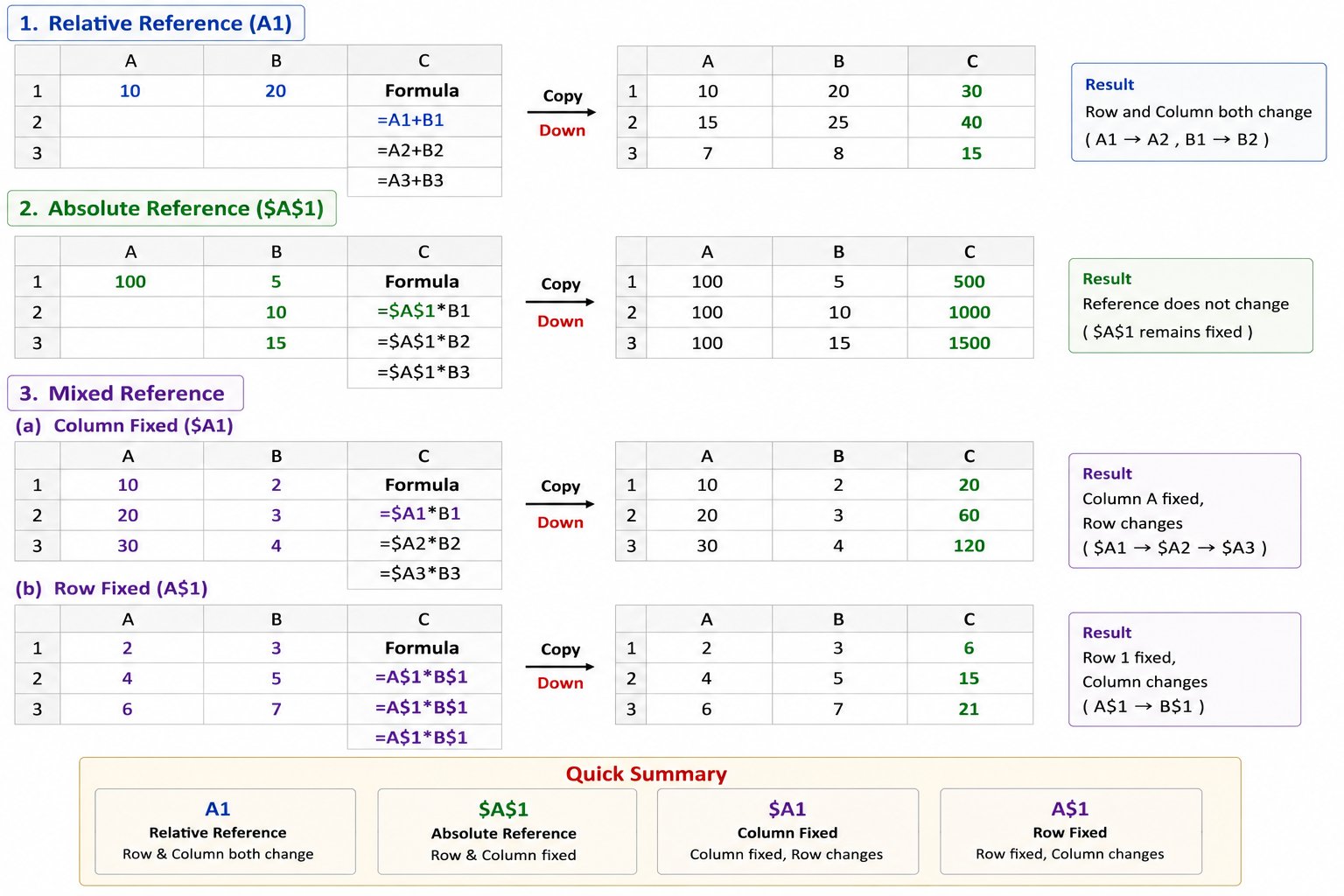
1. Relative Reference (सापेक्ष संदर्भ) -
यह सबसे सामान्य प्रकार का Reference है। जब Formula को किसी अन्य Cell में Copy किया जाता है, तो Row और Column दोनों बदल जाते हैं।
English
This is the most common type of reference. When a formula is copied to another cell, both the row and column change automatically.
Syntax -
A1
Example-
मान लीजिए / Suppose:
A1 = 10
B1 = 20
Formula: =A1+B1
2. Absolute Reference (निरपेक्ष संदर्भ) :-
जब किसी Cell Reference को Fix (स्थिर) करना हो, तब $ (Dollar) चिन्ह का उपयोग किया जाता है। Formula Copy करने पर Reference नहीं बदलता।
English
When a cell reference needs to remain fixed, the $ (Dollar) sign is used. The reference does not change when the formula is copied.
Syntax -
3. Mixed Reference (मिश्रित संदर्भ) :-
जब Row या Column में से केवल एक को Fix करना हो, तो Mixed Reference का उपयोग किया जाता है
When only the row or only the column needs to be fixed, a Mixed Reference is used.
(a) Column Fixed (कॉलम स्थिर) -
Syntax -$A1
Column A स्थिर रहेगा, लेकिन Row बदलेगी।
Column A remains fixed, but the row changes.
Copy Example -$A1 → $A2
(b) Row Fixed (रो स्थिर) -
Syntax -A$1
Row 1 स्थिर रहेगी, लेकिन Column बदलेगा।
Row 1 remains fixed, but the column changes.
Copy Example -A$1 → B$