Tools Menu (टूल्स मेनू):-
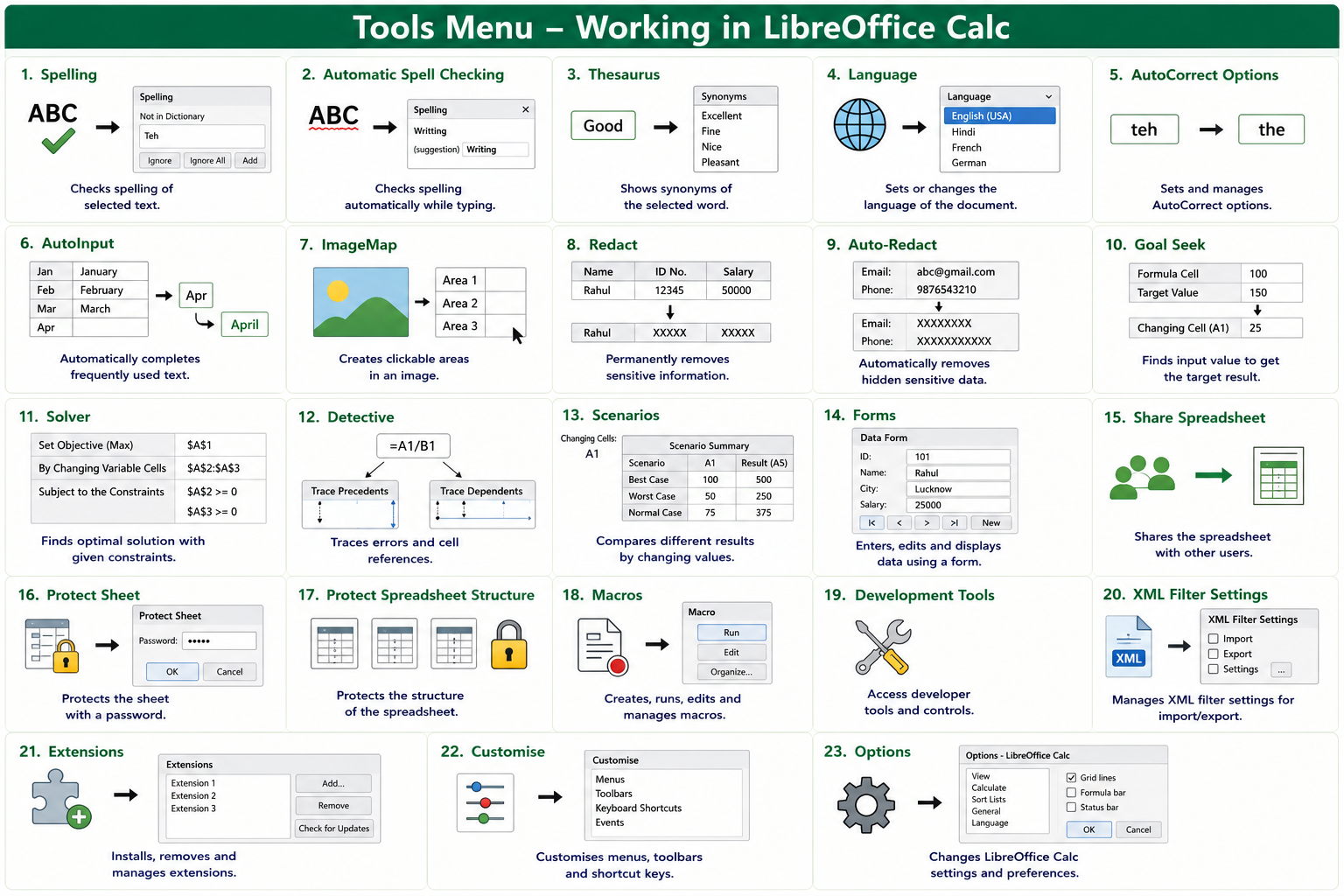
Hindi: Tools Menu का उपयोग Spelling Check, AutoCorrect, Goal Seek, Solver, Protection, Macros तथा Spreadsheet की विभिन्न Settings को Manage करने के लिए किया जाता है।
English: The Tools Menu is used to check spelling, use AutoCorrect, perform Goal Seek and Solver operations, protect spreadsheets, manage macros, and configure settings.
1. Spelling :-
Hindi: इस ऑप्शन के द्वारा Document की Spelling Check करने का कार्य करते हैं।
English: Used to check the spelling of the document.
Shortcut Key: F7
2. Automatic Spell Checking :-
Hindi: इस ऑप्शन के द्वारा टाइप करते समय Spelling की स्वतः जाँच होती है।
English: Used to check spelling automatically while typing.
Shortcut Key: Shift + F7
3. Thesaurus :-
Hindi: इस ऑप्शन के द्वारा किसी शब्द के समानार्थी (Synonyms) शब्द खोजने का कार्य करते हैं।
English: Used to find synonyms of a selected word.
Shortcut Key: Ctrl + F7
4. Language :-
Hindi: इस ऑप्शन के द्वारा Document की भाषा (Language) बदलने का कार्य करते हैं।
English: Used to change the language of the document.
Shortcut Key: No Default Shortcut
5. AutoCorrect Options :-
Hindi: इस ऑप्शन के द्वारा AutoCorrect के नियम (Rules) सेट करने का कार्य करते हैं।
English: Used to configure AutoCorrect settings.
Shortcut Key: No Default Shortcut
6. AutoInput :-
Hindi: इस ऑप्शन के द्वारा पहले टाइप किए गए Data को स्वतः पूरा (Auto Complete) करने का कार्य करते हैं।
English: Used to automatically complete previously entered data.
Shortcut Key: No Default Shortcut
7. ImageMap :-
Hindi: इस ऑप्शन के द्वारा Image में Clickable Area बनाने का कार्य करते हैं।
English: Used to create clickable areas in an image.
Shortcut Key: No Default Shortcut
8. Redact :-
Hindi: इस ऑप्शन के द्वारा गोपनीय (Sensitive) जानकारी को छिपाने का कार्य करते हैं।
English: Used to hide sensitive information from a document.
Shortcut Key: No Default Shortcut
9. Auto-Redact :-
Hindi: इस ऑप्शन के द्वारा गोपनीय जानकारी को स्वतः छिपाने का कार्य करते हैं।
English: Used to automatically hide sensitive information.
Shortcut Key: No Default Shortcut
10. Goal Seek :-
Hindi: इस ऑप्शन के द्वारा Formula में इच्छित परिणाम (Target Value) प्राप्त करने के लिए Input Value ज्ञात करते हैं।
English: Used to find the required input value to achieve a desired result.
Shortcut Key: No Default Shortcut
11. Solver :-
Hindi: इस ऑप्शन के द्वारा Constraints के अनुसार सर्वोत्तम (Optimal) समाधान प्राप्त करते हैं।
English: Used to find the best solution based on given conditions.
Shortcut Key: No Default Shortcut
12. Detective :-
Hindi: इस ऑप्शन के द्वारा Formula में Errors तथा Cell References की जाँच करते हैं।
English: Used to trace formulas and detect errors.
Shortcut Key: No Default Shortcut
13. Scenarios :-
Hindi: इस ऑप्शन के द्वारा अलग-अलग Values के आधार पर विभिन्न परिणाम (Scenarios) देखने का कार्य करते हैं।
English: Used to compare different results by changing values.
Shortcut Key: No Default Shortcut
14. Forms :-
Hindi: इस ऑप्शन के द्वारा Form बनाकर Data Entry करने का कार्य करते हैं।
English: Used to create forms for data entry.
Shortcut Key: No Default Shortcut
15. Share Spreadsheet :-
Hindi: इस ऑप्शन के द्वारा Spreadsheet को अन्य Users के साथ Share करने का कार्य करते हैं।
English: Used to share the spreadsheet with other users.
Shortcut Key: No Default Shortcut
16. Protect Sheet :-
Hindi: इस ऑप्शन के द्वारा Sheet को Password लगाकर सुरक्षित (Protect) करते हैं।
English: Used to protect a worksheet with a password.
Shortcut Key: No Default Shortcut
17. Protect Spreadsheet Structure :-
Hindi: इस ऑप्शन के द्वारा पूरी Spreadsheet की संरचना (Structure) को सुरक्षित करते हैं।
English: Used to protect the spreadsheet structure.
Shortcut Key: No Default Shortcut
18. Macros :-
Hindi: इस ऑप्शन के द्वारा Macro बनाने, चलाने तथा Manage करने का कार्य करते हैं।
English: Used to create, run, and manage macros.
Shortcut Key: Alt + F8
19. Development Tools :-
Hindi: इस ऑप्शन के द्वारा Developer Tools का उपयोग करने का कार्य करते हैं।
English: Used to access developer tools.
Shortcut Key: No Default Shortcut
20. XML Filter Settings :-
Hindi: इस ऑप्शन के द्वारा XML Filter की Settings को Manage करते हैं।
English: Used to manage XML filter settings.
Shortcut Key: No Default Shortcut
21. Extensions :-
Hindi: इस ऑप्शन के द्वारा Extensions को Install, Remove तथा Manage करते हैं।
English: Used to install, remove, and manage extensions.
Shortcut Key: Ctrl + Alt + E
22. Customise:-
Hindi: इस ऑप्शन के द्वारा Menu, Toolbar तथा Shortcut Keys को अपनी आवश्यकता के अनुसार बदलते हैं।
English: Used to customize menus, toolbars, and shortcut keys.
Shortcut Key: No Default Shortcut
23. Options :-
Hindi: इस ऑप्शन के द्वारा LibreOffice Calc की Settings बदलने का कार्य करते हैं।
English: Used to change LibreOffice Calc settings.
Shortcut Key: Alt + F12