Elements of Spreadsheet Window (स्प्रेडशीट विंडो के भाग):-
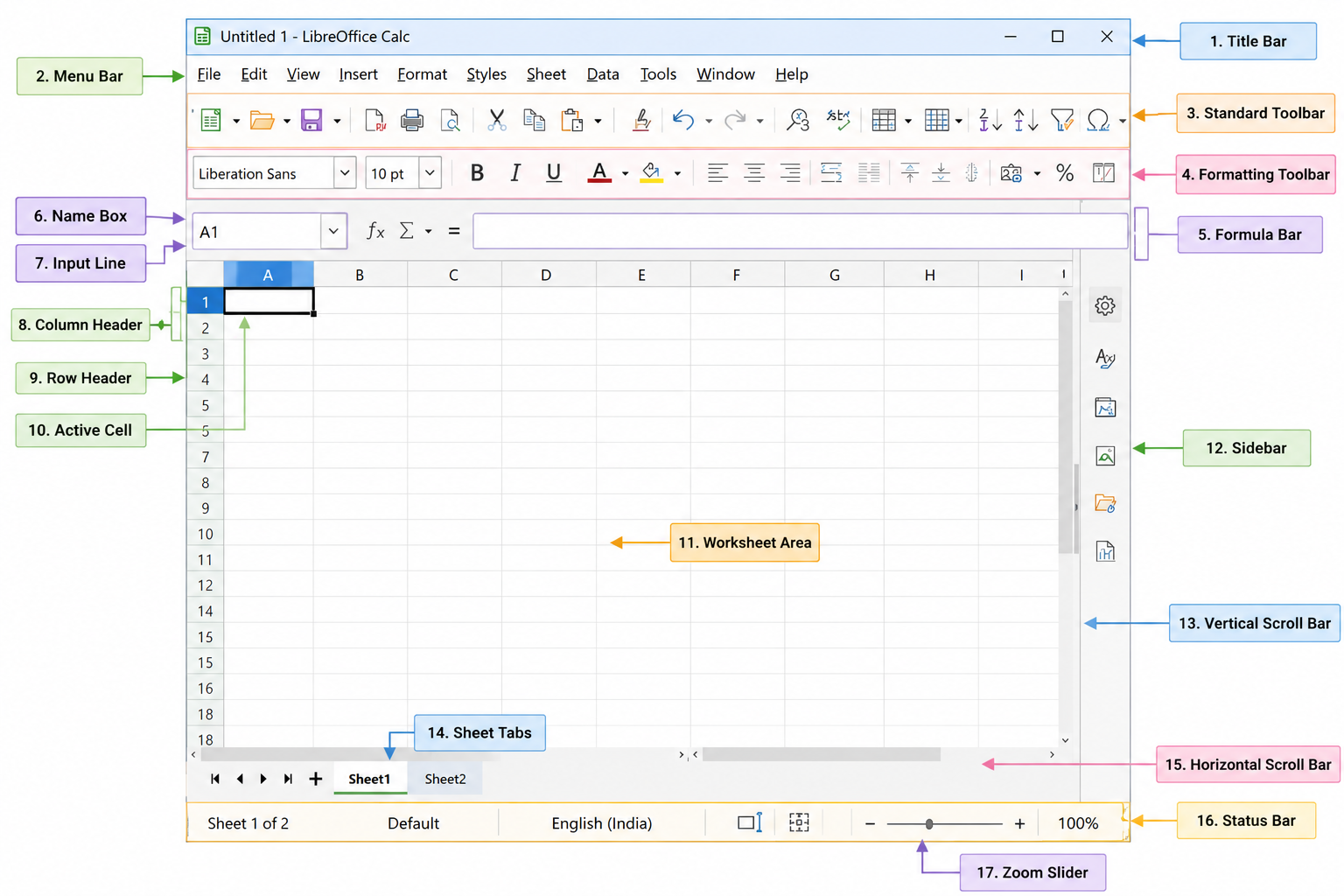
LibreOffice Calc Window (स्प्रेडशीट विंडो) कई भागों से मिलकर बनी होती है। प्रत्येक भाग का अपना विशेष कार्य होता है।
- Title Bar (टाइटल बार): वर्तमान Spreadsheet (फ़ाइल) का नाम तथा LibreOffice Calc का नाम प्रदर्शित करता है।
- Menu Bar (मेनू बार): सभी Menus (File, Edit, View, Insert, Format, Styles, Sheet, Data, Tools, Window, Help) उपलब्ध कराता है।
- Standard Toolbar (स्टैंडर्ड टूलबार): New, Open, Save, Print, Cut, Copy, Paste, Undo, Redo आदि सामान्य Commands प्रदान करता है।
- Formatting Toolbar (फ़ॉर्मेटिंग टूलबार): Font, Font Size, Bold, Italic, Underline, Alignment, Border, Color आदि विकल्प उपलब्ध कराता है।
- Name Box (नेम बॉक्स): Active Cell का Address (जैसे A1, B5) प्रदर्शित करता है।
- Formula Bar (फॉर्मूला बार): Data, Formula तथा Function दर्ज करने और संपादित करने के लिए उपयोग किया जाता है।
- Column Header (कॉलम हेडर): Columns को A, B, C... XFD द्वारा प्रदर्शित करता है।
- Row Header (रो हेडर): Rows को 1, 2, 3... द्वारा प्रदर्शित करता है।
- Active Cell (सक्रिय सेल): वर्तमान में चयनित Cell, जिसमें Data दर्ज किया जाता है।
- Worksheet Area (वर्कशीट क्षेत्र): Cells का मुख्य कार्य क्षेत्र, जहाँ Data दर्ज और संपादित किया जाता है।
- Sheet Tabs (शीट टैब): विभिन्न Worksheets के बीच बदलने (Switch) के लिए उपयोग किया जाता है।
- Horizontal Scroll Bar (क्षैतिज स्क्रॉल बार): Worksheet को बाएँ और दाएँ ले जाने के लिए।
- Vertical Scroll Bar (ऊर्ध्वाधर स्क्रॉल बार): Worksheet को ऊपर और नीचे ले जाने के लिए।
- Status Bar (स्टेटस बार): वर्तमान स्थिति, चयनित डेटा की जानकारी तथा Zoom Level प्रदर्शित करता है।
- Zoom Slider (ज़ूम स्लाइडर): Worksheet को Zoom In और Zoom Out करने के लिए।
- Sidebar (साइडबार): Properties, Styles, Gallery तथा अन्य Formatting विकल्प प्रदान करता है।
English
The LibreOffice Calc window consists of several components, and each component has a specific function.
- Title Bar: Displays the current spreadsheet (file) name and LibreOffice Calc.
- Menu Bar: Provides all menus such as File, Edit, View, Insert, Format, Styles, Sheet, Data, Tools, Window, and Help.
- Standard Toolbar: Contains common commands such as New, Open, Save, Print, Cut, Copy, Paste, Undo, and Redo.
- Formatting Toolbar: Provides options like Font, Font Size, Bold, Italic, Underline, Alignment, Border, and Color.
- Name Box: Displays the address of the active cell (e.g., A1, B5).
- Formula Bar: Used to enter and edit data, formulas, and functions.
- Column Header: Displays columns as A, B, C... XFD.
- Row Header: Displays rows as 1, 2, 3...
- Active Cell: The currently selected cell where data is entered.
- Worksheet Area: The main working area containing cells for entering and editing data.
- Sheet Tabs: Used to switch between different worksheets.
- Horizontal Scroll Bar: Scrolls the worksheet left and right.
- Vertical Scroll Bar: Scrolls the worksheet up and down.
- Status Bar: Displays the current status, selected data information, and zoom level.
- Zoom Slider: Used to zoom in and zoom out the worksheet.
- Sidebar: Provides properties, styles, gallery, and formatting options.