Layers (लेयर्स)
Hindi:
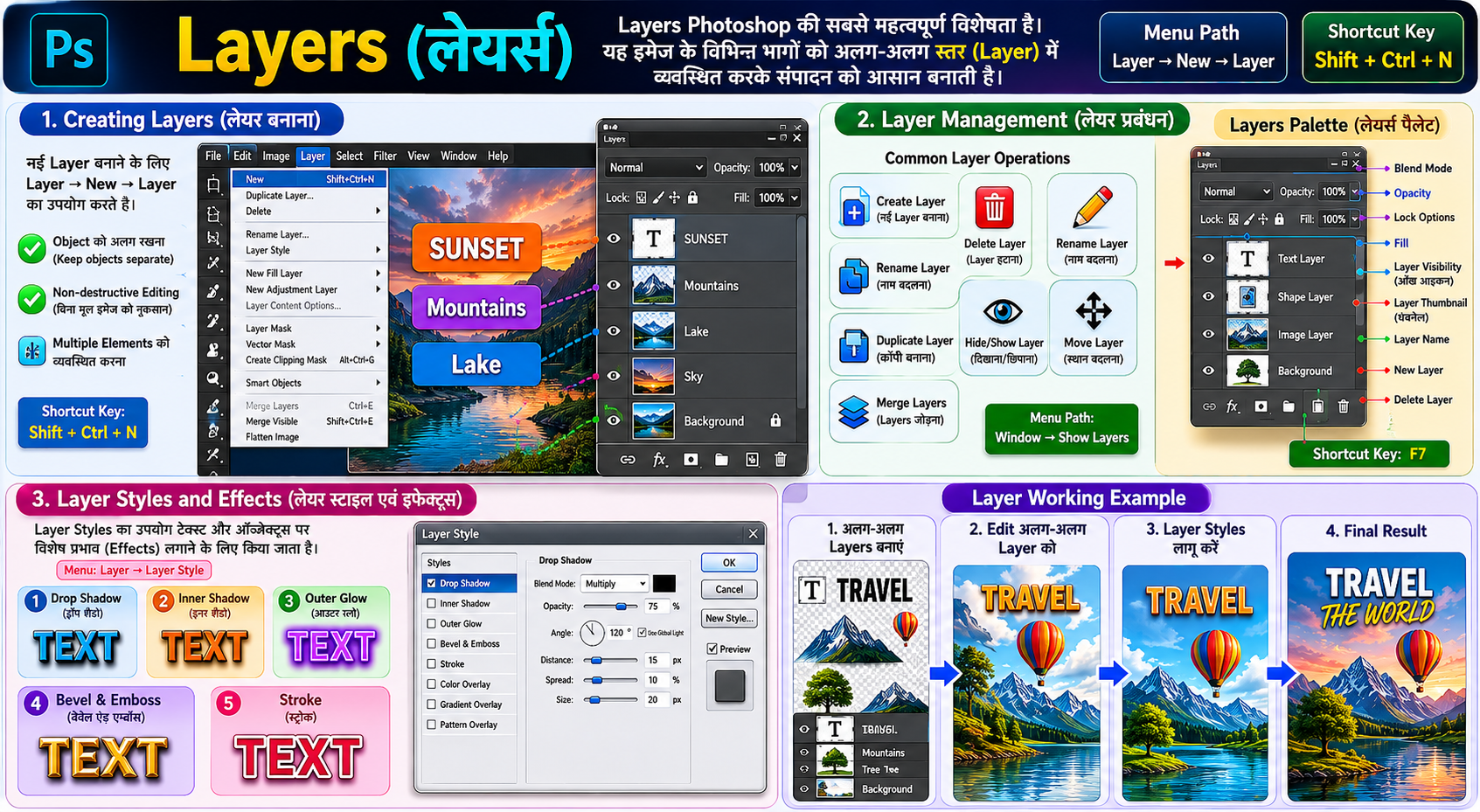
Layers Photoshop की सबसे महत्वपूर्ण विशेषता है। Layers का उपयोग इमेज के विभिन्न भागों को अलग-अलग स्तर (Layer) में व्यवस्थित करने के लिए किया जाता है, जिससे संपादन करना आसान हो जाता है।
English:
Layers are one of the most important features of Photoshop. They allow different parts of an image to be placed on separate layers, making editing easier and more flexible.
1. Creating Layers (लेयर बनाना) Hindi:
नई Layer बनाने के लिए Layer → New → Layer का उपयोग किया जाता है।
English:
A new layer can be created using Layer → New → Layer.
Uses:
- Object को अलग रखना
- Non-destructive Editing
- Multiple Elements को व्यवस्थित करना
Shortcut Key:
Shift + Ctrl + N
2. Layer Management (लेयर प्रबंधन) Hindi:
Layer Management का उपयोग Layers को व्यवस्थित, संपादित और नियंत्रित करने के लिए किया जाता है।
English:
Layer Management is used to organize, edit, and control layers.
Common Layer Operations:
- Create Layer (नई Layer बनाना)
- Delete Layer (Layer हटाना)
- Rename Layer (नाम बदलना)
- Duplicate Layer (कॉपी बनाना)
- Hide/Show Layer (दिखाना/छिपाना)
- Move Layer (स्थान बदलना)
- Merge Layers (Layers जोड़ना)
Important Panel:
Layers Palette:-
Layers Palette Photoshop का एक महत्वपूर्ण पैनल है, जिसका उपयोग Layers को देखने, व्यवस्थित करने, छिपाने, लॉक करने, डुप्लीकेट बनाने तथा विभिन्न Effects लागू करने के लिए किया जाता है।
English:
The Layers Palette is an important Photoshop panel used to view, organize, hide, lock, duplicate, and apply effects to layers.
Menu Path:
Window → Show Layers
Shortcut Key:
F7
3. Layer Styles and Effects (लेयर स्टाइल एवं इफेक्ट्स) Hindi:
Layer Styles का उपयोग टेक्स्ट और ऑब्जेक्ट्स पर विशेष प्रभाव (Effects) लगाने के लिए किया जाता है।
English:
Layer Styles are used to apply special effects to text and objects.
Common Layer Effects: Menu:
Layer → Layer Style
1. Drop Shadow
Hindi: ऑब्जेक्ट के पीछे छाया जोड़ता है।
English: Adds a shadow behind the object.
2. Inner Shadow
Hindi: ऑब्जेक्ट के अंदर छाया प्रभाव देता है।
English: Adds a shadow inside the object.
3. Outer Glow
Hindi: ऑब्जेक्ट के चारों ओर चमक जोड़ता है।
English: Adds a glow around the object.
4. Bevel and Emboss
Hindi: 3D उभरा हुआ प्रभाव देता है।
English: Creates a raised 3D effect.
5. Stroke
Hindi: ऑब्जेक्ट के चारों ओर बॉर्डर बनाता है।
English: Adds an outline around the object.