Flow Line / Arrow (फ्लो लाइन / तीर चिन्ह) :-
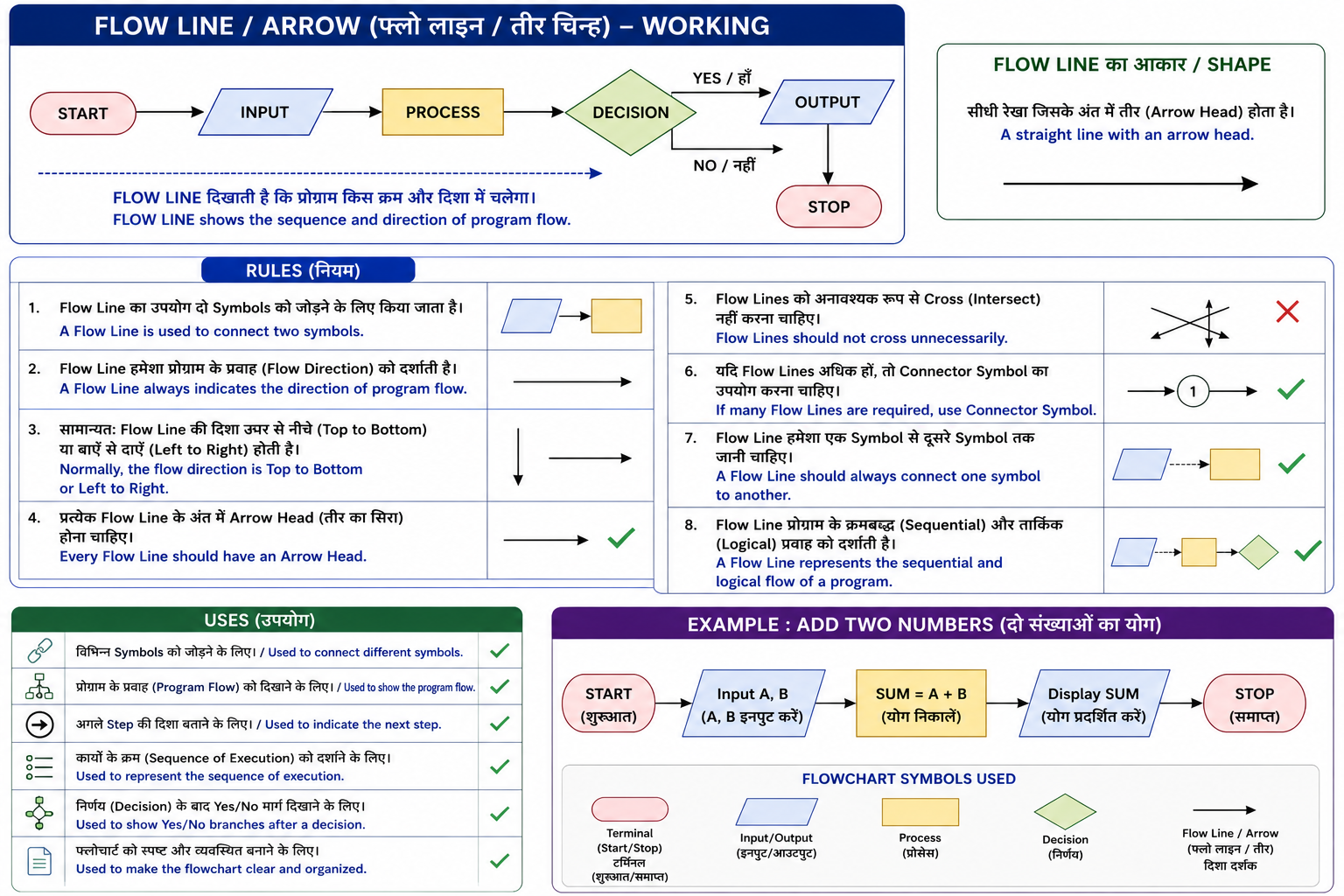
Flow Line (Arrow) फ्लोचार्ट में विभिन्न Symbols को आपस में जोड़ने (Connect) तथा प्रोग्राम के कार्यों का क्रम (Sequence of Execution) दिखाने के लिए उपयोग की जाती है। यह बताती है कि प्रक्रिया (Process) किस दिशा (Direction) में आगे बढ़ेगी और अगला Step कौन-सा होगा।
Flow Line का आकार सीधी रेखा (Line) जिसके अंत में तीर (Arrow Head) होता है।
English
A Flow Line (Arrow) is used in a flowchart to connect different symbols and to indicate the sequence of execution of a program. It shows the direction of program flow and identifies the next step in the process.
Its shape is a line with an arrowhead.
Rules (महत्वपूर्ण नियम) :-
- Flow Line का उपयोग दो Symbols को जोड़ने के लिए किया जाता है। / A Flow Line is used to connect two symbols.
- Flow Line हमेशा प्रोग्राम के प्रवाह (Flow Direction) को दर्शाती है। / A Flow Line always indicates the direction of program flow.
- सामान्यतः Flow Line की दिशा ऊपर से नीचे (Top to Bottom) या बाएँ से दाएँ (Left to Right) होती है। / Normally, the flow direction is from Top to Bottom or Left to Right.
- प्रत्येक Flow Line के अंत में Arrow Head (तीर का सिरा) होना चाहिए। / Every Flow Line should have an Arrow Head.
- Flow Lines को अनावश्यक रूप से Cross (Intersect) नहीं करना चाहिए। / Flow Lines should not cross unnecessarily.
- यदि Flow Lines अधिक हों, तो Connector Symbol का उपयोग करना चाहिए। / If many flow lines are required, a Connector Symbol should be used.
- Flow Line हमेशा एक Symbol से दूसरे Symbol तक जानी चाहिए। / A Flow Line should always connect one symbol to another.
- Flow Line प्रोग्राम के क्रमबद्ध (Sequential) और तार्किक (Logical) प्रवाह को दर्शाती है। / A Flow Line represents the sequential and logical flow of a program.
Uses (उपयोग) :-
- विभिन्न Symbols को जोड़ने के लिए। / Used to connect different symbols.
- प्रोग्राम के प्रवाह (Program Flow) को दिखाने के लिए। / Used to show the program flow.
- अगले Step की दिशा बताने के लिए। / Used to indicate the next step.
- कार्यों के क्रम (Sequence of Execution) को दर्शाने के लिए। / Used to represent the sequence of execution.
- निर्णय (Decision) के बाद Yes/No मार्ग दिखाने के लिए। / Used to show Yes/No branches after a decision.
- फ्लोचार्ट को स्पष्ट और व्यवस्थित बनाने के लिए। / Used to make the flowchart clear and organized.