Interactive Mode (Python Interactive Mode) / इंटरैक्टिव मोड (पायथन इंटरैक्टिव मोड) :-
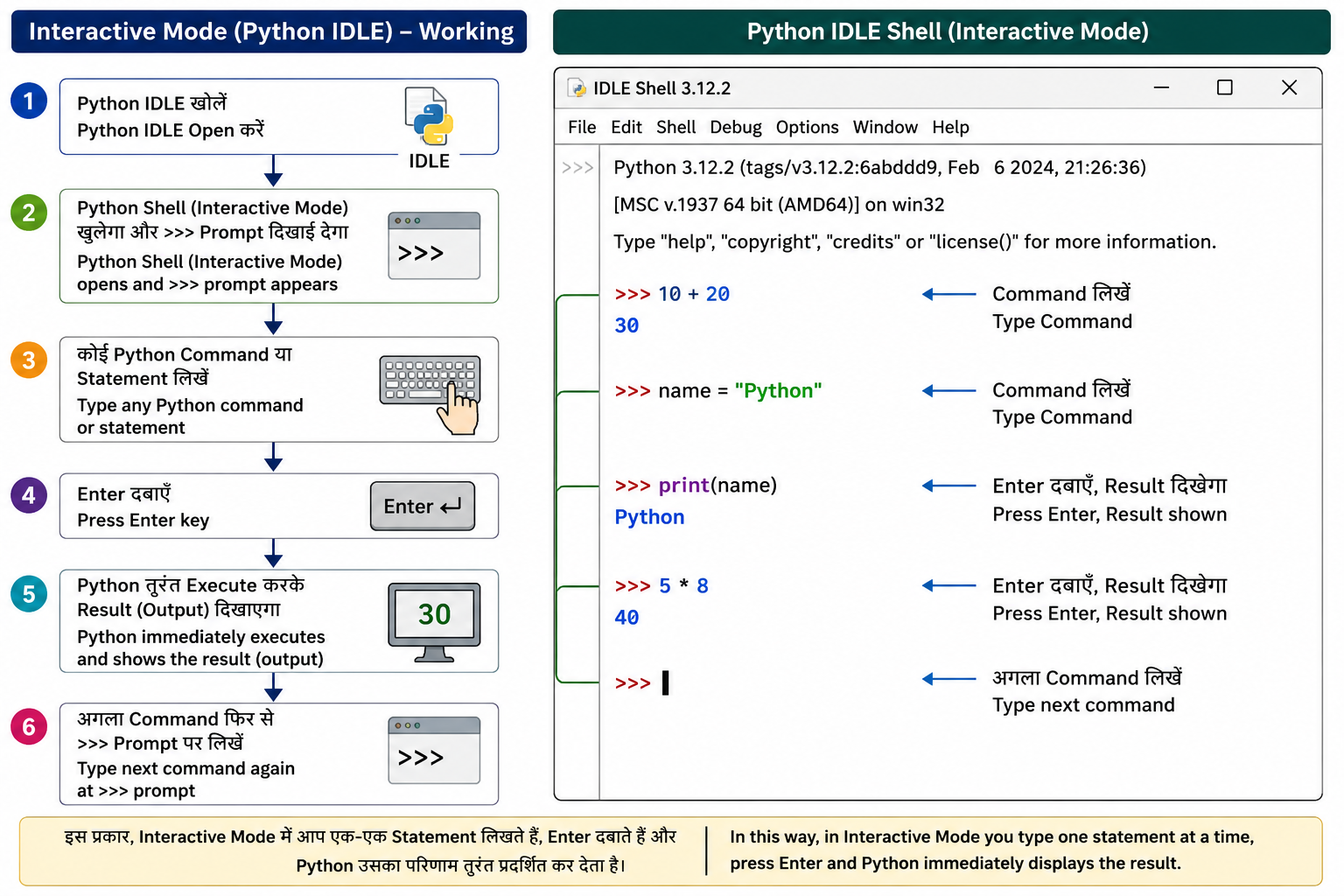
Interactive Mode (Python IDLE) Python को चलाने का वह तरीका है जिसमें उपयोगकर्ता (User) एक-एक Statement (कथन) या Command (आदेश) लिखता है और Enter दबाते ही Python उसका परिणाम तुरंत (Immediately) प्रदर्शित कर देता है।
इसे Python Shell (पायथन शेल), REPL (Read-Eval-Print Loop) या Interactive Interpreter (इंटरैक्टिव इंटरप्रेटर) भी कहा जाता है।
English:
Interactive Mode is a way of running Python in which the user enters one statement or command at a time. As soon as the Enter key is pressed, Python immediately executes the command and displays the result.
It is also known as the Python Shell, REPL (Read-Eval-Print Loop), or Interactive Interpreter.
Working of Interactive Mode / इंटरैक्टिव मोड की कार्यप्रणाली
- Python Interpreter (पायथन इंटरप्रेटर) प्रारम्भ करें।
- स्क्रीन पर >>> Prompt (प्रॉम्प्ट) दिखाई देगा।
- कोई Python Command (आदेश) या Statement (कथन) लिखें।
- Enter कुंजी दबाएँ।
- Python उस Statement को तुरंत Execute (निष्पादित) करके Result (परिणाम) प्रदर्शित करेगा।
- अगला Command फिर से >>> Prompt पर लिखा जा सकता है।
English
- Start the Python Interpreter.
- The >>> Prompt will appear on the screen.
- Type a Python command or statement.
- Press the Enter key.
- Python immediately executes the statement and displays the result.
- The next command can be entered again at the >>> prompt.
Example / उदाहरण -
Interactive Mode में प्रत्येक Statement लिखकर Enter दबाते ही Python उसे तुरंत Execute कर देता है और परिणाम स्क्रीन पर दिखा देता है।
English:
Every statement is executed immediately after pressing the Enter key, and the output is displayed instantly.
छोटे Programs, Commands तथा Expressions का परीक्षण (Testing) आसानी से किया जा सकता है।
English:
Small programs, commands, and expressions can be tested quickly and easily.
यदि Program में कोई Syntax Error या अन्य छोटी त्रुटि होती है, तो Python तुरंत Error Message दिखा देता है, जिससे उसे आसानी से ठीक किया जा सकता है।
English:
If there is a syntax error or any other small mistake, Python immediately displays an error message, making debugging easier.
Interactive Mode में Program लिखने के लिए किसी अलग Python File (.py) को बनाने या Save करने की आवश्यकता नहीं होती।
English:
No separate Python file (.py) is required. Commands can be executed without creating or saving a program file.
यह Mode विशेष रूप से Beginners (शुरुआती विद्यार्थियों) के लिए उपयोगी है क्योंकि वे प्रत्येक Command का परिणाम तुरंत देख सकते हैं।
English:
This mode is ideal for beginners because they can see the result of each command immediately.