Installing Python (पायथन इंस्टॉल करना) :-
Python Installation वह प्रक्रिया है जिसके द्वारा Python Interpreter को Computer में Install किया जाता है ताकि Python Programs को लिखा, चलाया (Execute), और Debug किया जा सके।
Python Install होने के बाद हम Python Shell, IDLE तथा अन्य Code Editors (जैसे VS Code, PyCharm) में Python Program चला सकते हैं।
English
Python Installation is the process of installing the Python Interpreter on a computer so that Python programs can be written, executed, and debugged.
After installing Python, we can run Python programs using Python Shell, IDLE, or other code editors such as VS Code and PyCharm.
Steps to Install Python on Windows (Windows पर Python Install करने के चरण) :-
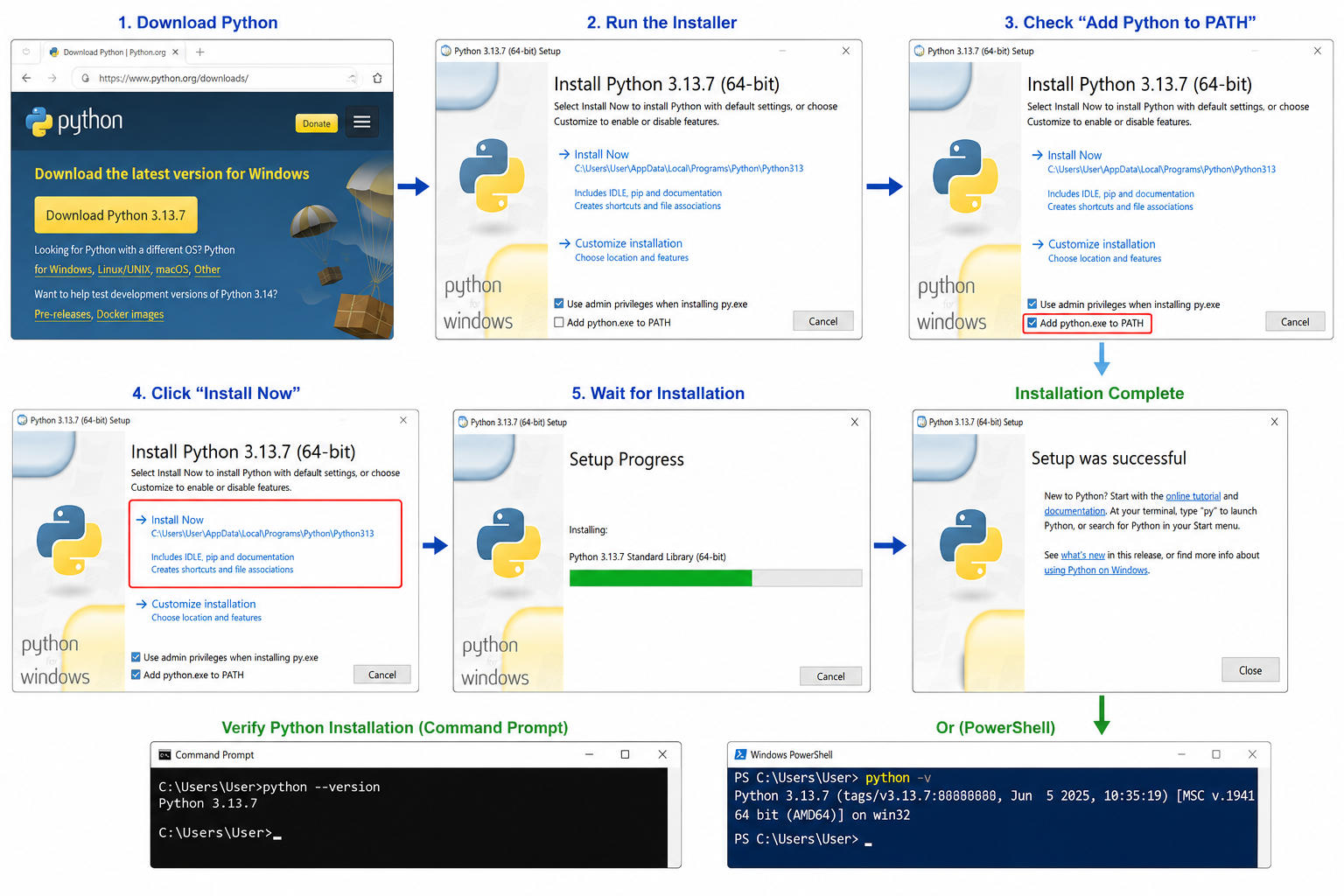
Step 1: Download Python
- Open your web browser.
- Visit the official Python website:
https://www.python.org/downloads/ - Download the latest stable version for Windows.
Step 2: Run the Installer
- Double-click the downloaded Python Installer (.exe) file.
- The Python Setup window will open.
Step 3: Check "Add Python to PATH"
Before clicking Install Now, check the option:
✅ Add Python to PATH
This allows Python to be executed from the Command Prompt or PowerShell.
Step 4: Click "Install Now"
Click the Install Now button.
The installer will automatically install:
- Python Interpreter
- Python Standard Library
- pip (Package Manager)
- IDLE (Python IDE)
- Documentation
Step 5: Wait for Installation
The installation process may take a few minutes.
When installation completes, you will see:
Setup was successful
Click Close.
Verify Python Installation (Python Installation की जाँच) :-
Open Command Prompt or PowerShell and type: -
or
Example Output: